
Dungeon Generator
START WITH THE BIG PICTURE
What does this part of Epok do?
The dungeon tools assemble levels from authored rooms and generation rules.
- 01Author rooms and styles
- 02Configure a recipe and seed
- 03Generate and inspect the result
What is happening under the hood?
- Recipes support branches, loops, keys, locks and floors.
- Generated results can be previewed and queried by gameplay.
- The runtime and renderer remain subject to project budgets.
Field note: Start with a small recipe before adding complex constraints.
A Dungeon Generator lays out rooms, corridors and doors from a seed and bakes the result into the map as ordinary Epok content. Rooms are either scattered over a grid or grown by a Dungeon Recipe: a designed route from spawn to goal with branches, loops, items, keys and locks, and one-way doors. The same seed and settings always produce the same dungeon, so what you see in the editor is exactly what ships: the console runs the baked map and does no generation work of its own.
| Output | 3D generator | 2D generator |
|---|---|---|
| Floors and walls | EditableMesh sections under assets/Dungeons/<name>/ |
One TileMapLayer painted with Floor and Wall terrains |
| Collision | One compound collider holding every floor, wall and doorway box | The TileSet's tile collision |
| Navigation | Navigation bake volumes over the floor, spaced for the node budget | — |
| Gameplay points | Spawn and Goal actors at the centres of the spawn and goal rooms |
Spawn and Goal Node2D actors |
| Keys, locks, items | Spots for the style: blockout markers by default, or your own actors | Spots for the style: marker tiles by default, or your own actors |
| Look | A Dungeon Style: the built-in sci-fi panels with a ceiling, or meshes, lights and actors | A Dungeon Style: the built-in tiles, or any TileSet's terrains and tiles |
Create a dungeon
- 3D: choose GameObject > 3D Object > Dungeon Generator, or the same entry in the Hierarchy's create menu.
- 2D: choose Add 2D Node and search for
DungeonGenerator(group Level).
The generator appears at the map origin (3D) or at the centre of the 2D view, generates a first dungeon straight away and frames the Scene view on it. The generated actors are children of the generator, so moving the generator moves the whole dungeon.
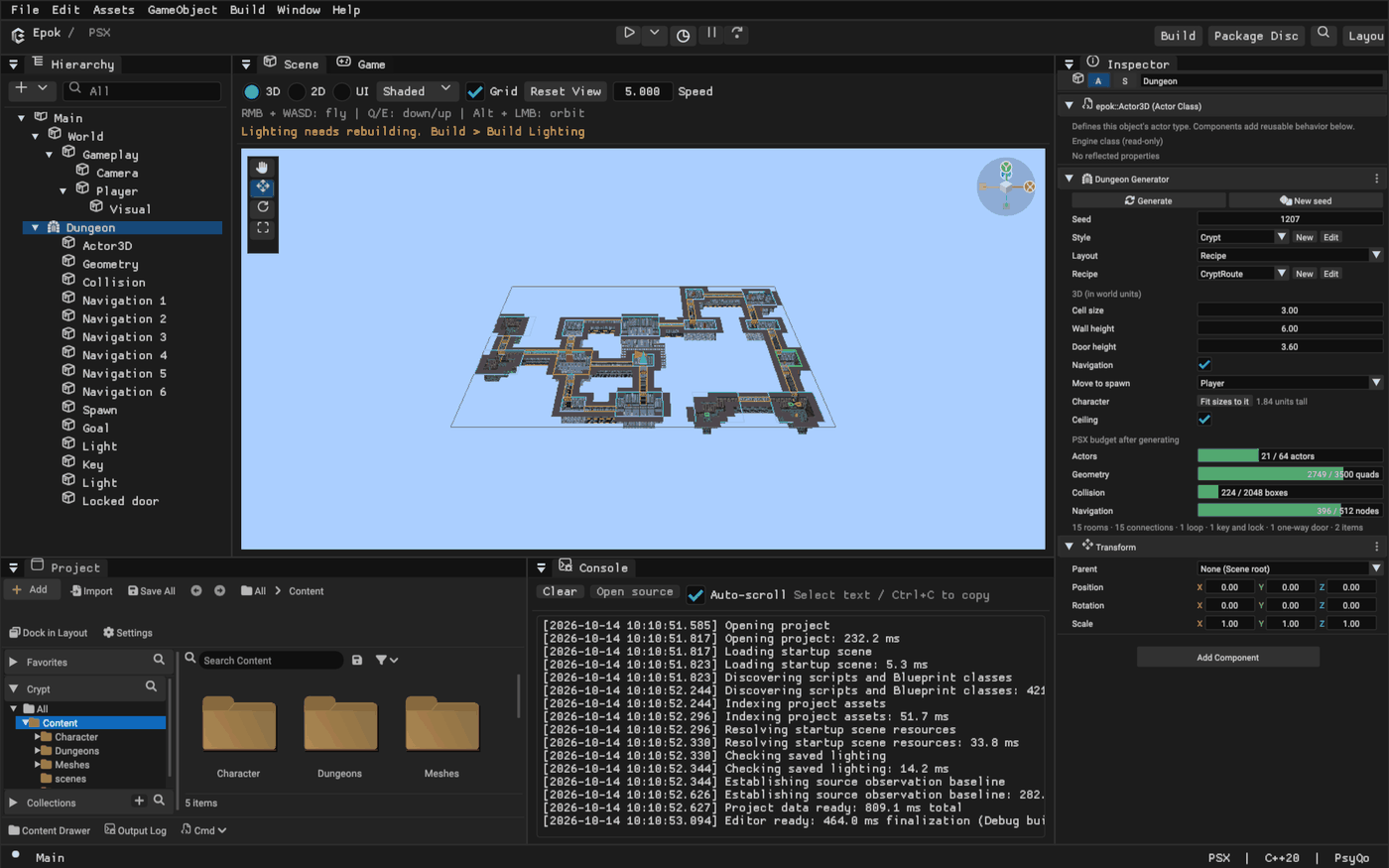
The Dungeon Generator band
Select the generator to edit it in the Inspector.
- Generate rebuilds the dungeon from the current settings. New seed picks another seed and generates. Both are one undo step: Ctrl+Z brings back the previous dungeon.
- While the generator is selected in 3D, the Scene view draws its layout: the grid outline, rooms (spawn green, goal red), corridor walls and doors. Before the first generation, or when the settings changed, the outline lies on the floor; afterwards it floats just above the walls.
- An amber box lists anything that needs attention, with a button where there is an obvious fix: nothing generated yet, settings changed since the last generation, a rotated or scaled generator, rooms that did not fit, or a budget overrun.
- The three-dot menu holds Remove generated content (the generator keeps its settings) and Reset settings.
Layout settings
Layout chooses where the rooms come from: Rooms and corridors scatters rooms over a grid with the settings below; Recipe follows a Dungeon Recipe and replaces them with a Recipe row (built-in recipe or any recipe asset, with New and Edit like the style row).
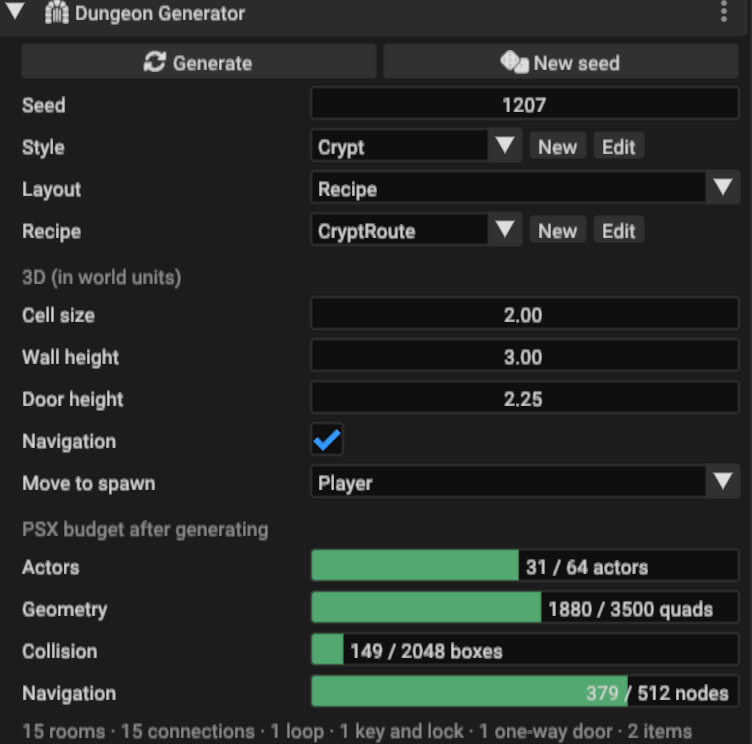
| Setting | Meaning | Default |
|---|---|---|
| Seed | Chooses the dungeon; same seed, same dungeon | random on creation |
| Grid size | Cells across and deep | 40 × 40 |
| Rooms | Rooms to place; a crowded grid fits fewer | 10 |
| Room size | Smallest and largest room side, in cells | 4 – 8 |
| Spacing | Empty cells kept between rooms; a corridor needs three to pass between two rooms | 3 |
| Corridor width | Corridor width in cells | 1 |
| Loops | Chance, in percent, that each extra connection becomes a loop; 0 gives a tree | 25 |
Rooms are placed at random positions that keep the spacing. Rooms whose centres see each other across an empty circle are candidate connections; a spanning tree of them connects every room, and each remaining candidate becomes a loop with the Loops chance. Corridors are routed around other rooms, prefer straight runs and merge into corridors that already exist. Spawn and goal are the two rooms the most connections apart.
3D settings
| Setting | Meaning | Default |
|---|---|---|
| Cell size | World units per grid cell | 3 |
| Wall height | Height of walls, wall tops and the ceiling | 6 |
| Door height | Doorways are open below this height; a beam fills the rest | 3.6 |
| Navigation | Add navigation bake volumes over the floor | on |
| Player | The player: placed at the spawn room's centre after each generation, and the only actor that picks up keys | none |
| Character | Fit sizes to it sets cell size, wall and door heights from the Player's collider | — |
| Ceiling | Close the dungeon from above at the wall height | on |
The defaults fit the Third Person template's character (1.84 units tall) the way third-person console games frame their heroes: corridors about 1.6 times its height, doors twice, walls more than three times, so the camera behind the character sees walls and never the sky. For another character choose it as Player and press Fit sizes to it. Turn Ceiling off for top-down cameras: the ceiling faces down, so it hides nothing from above, but it also stops anything flying out. With a ceiling the dungeon's geometry casts no shadows: the map's light reaches floors and walls, and the ceiling stays dark.
Walls are the solid cells around every floor, so the dungeon reads from above as well as from inside. Floors and walls are one face per cell: every vertex then lies on the grid, which avoids the one-pixel cracks the PSX shows where an edge ends in the middle of another face, and gives baked lighting a vertex at every cell corner. Run Build > Build Lighting after generating, or let Build and Play bake it. A map without a directional light of its own gets one with the dungeon; point lights from a style are local accents on top of it.
Built-in textures
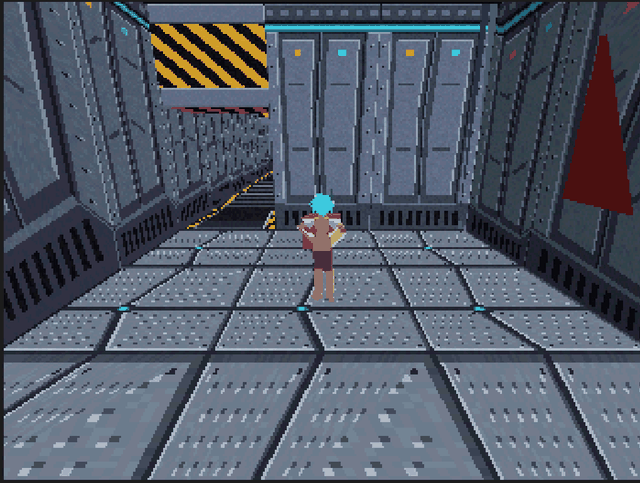
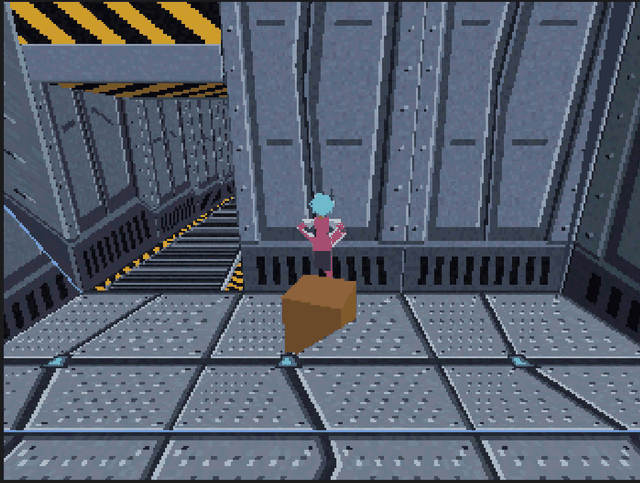
The built-in 3D look uses ten textures drawn for the console by
tools/build_dungeon_textures.py. The first generation imports those it uses into
assets/Dungeons/Textures/, always under the same asset identities, and refreshes them
in place when a newer Epok draws them differently.
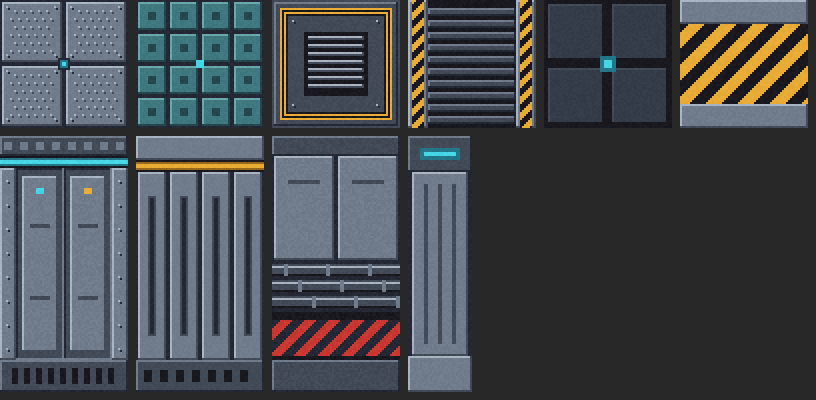
- Room floors, one per room: steel plates with a lit hatch, a grid of teal panels, or a dark plate framed in amber around a grate.
- Room walls, one per room: panels with a cyan light strip, wide ribs under an amber band, or plain panels over pipes and a red warning band. Corridor walls use the first.
- Corridors: a grated floor with hazard rails, turned with the corridor.
- Columns along the walls of rooms, about one every two cells, with a lit capital.
- Ceiling panels and a hazard-striped doorway beam.
A room keeps its floor and walls throughout, so each room reads as a place of its own.
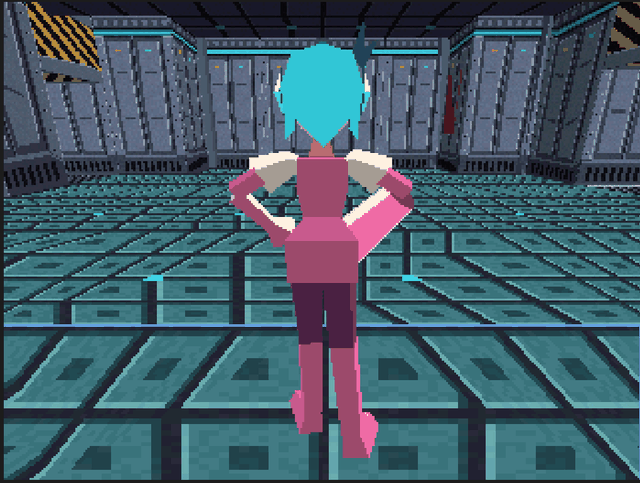
The console clamps texture coordinates instead of repeating them, so every Blockout face maps its texture exactly once: a floor or ceiling cell, a wall side from just below the floor to the ceiling, a doorway beam. Draw your own Blockout textures the same way; a wall texture twice as tall as wide suits the default proportions.
2D settings
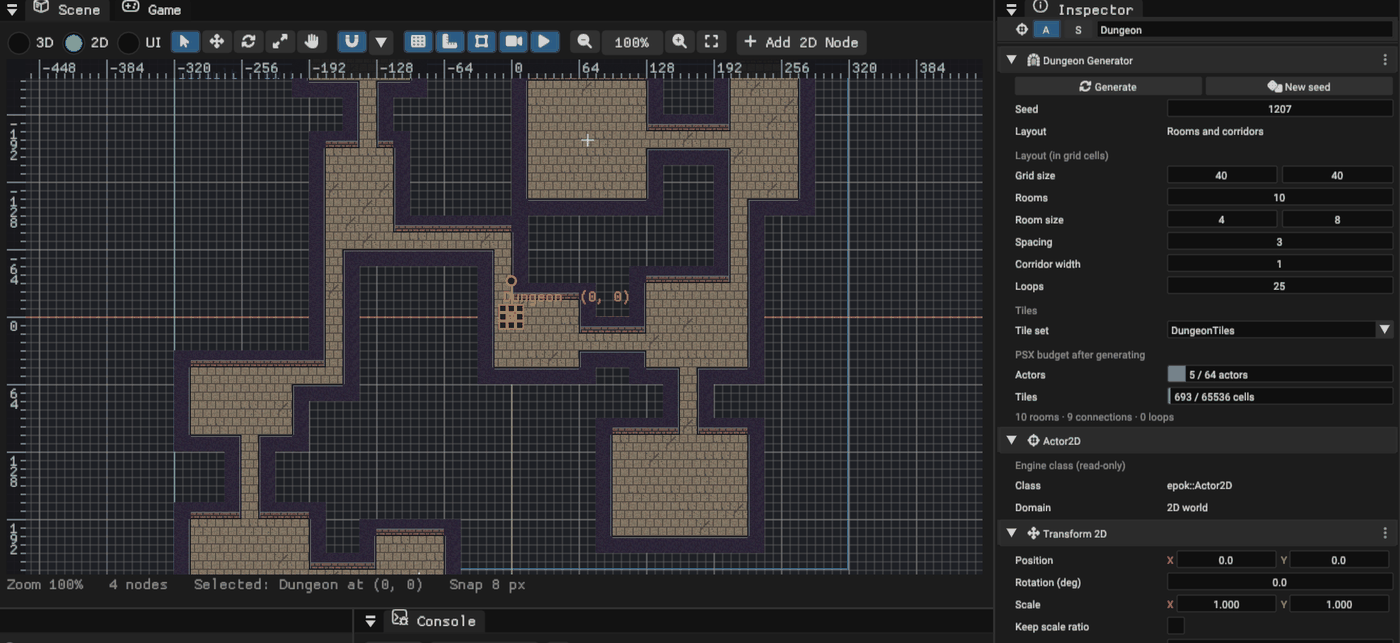
Tile set is the TileSet the style's terrains and tiles use when they name none.
Built-in dungeon tiles creates assets/Dungeons/DungeonTiles.epokasset on first use:
stone floor variants and solid walls with a brick face towards the room. Any TileSet
works when it has a terrain set holding the terrains the style paints (the built-in
look uses Floor and Wall); the TileSet's own terrain rules choose the tiles,
and its tile collision makes walls solid. One grid cell is one tile.
Player works as in 3D: the chosen 2D actor is placed on the spawn room's centre (through any parent's position, rotation and scale) and is the only actor that picks up keys.
The player
The band's Player names the actor generation treats as the player: it is moved to
the spawn room's centre after each generation, and every generated key names it in its
player property, so only the player picks keys up; enemies, projectiles and other
moving colliders pass through them. Without a Player keys are picked up by anything
that enters them; the band then warns, and offers Use Player when the map has an
actor called Player.
Dungeon Recipes
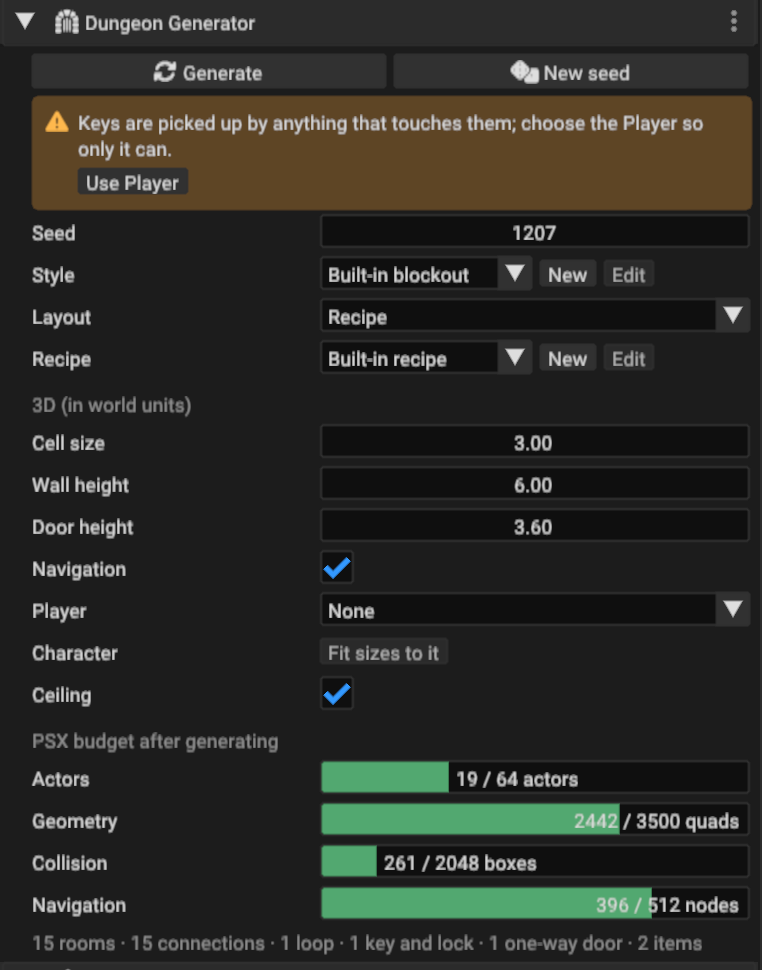
A Dungeon Recipe is a list of steps that grows a dungeon's room graph, then lays it out on the grid. Where Rooms and corridors places rooms at random, a recipe designs the route: the player starts at the spawn, the goal waits at the end of the main path, side branches hide treasure, a key opens a locked door further on, and one-way doors offer shortcuts back.
- Set the generator's Layout to Recipe. Without a recipe asset it follows the
built-in recipe; New creates a recipe asset from it (under
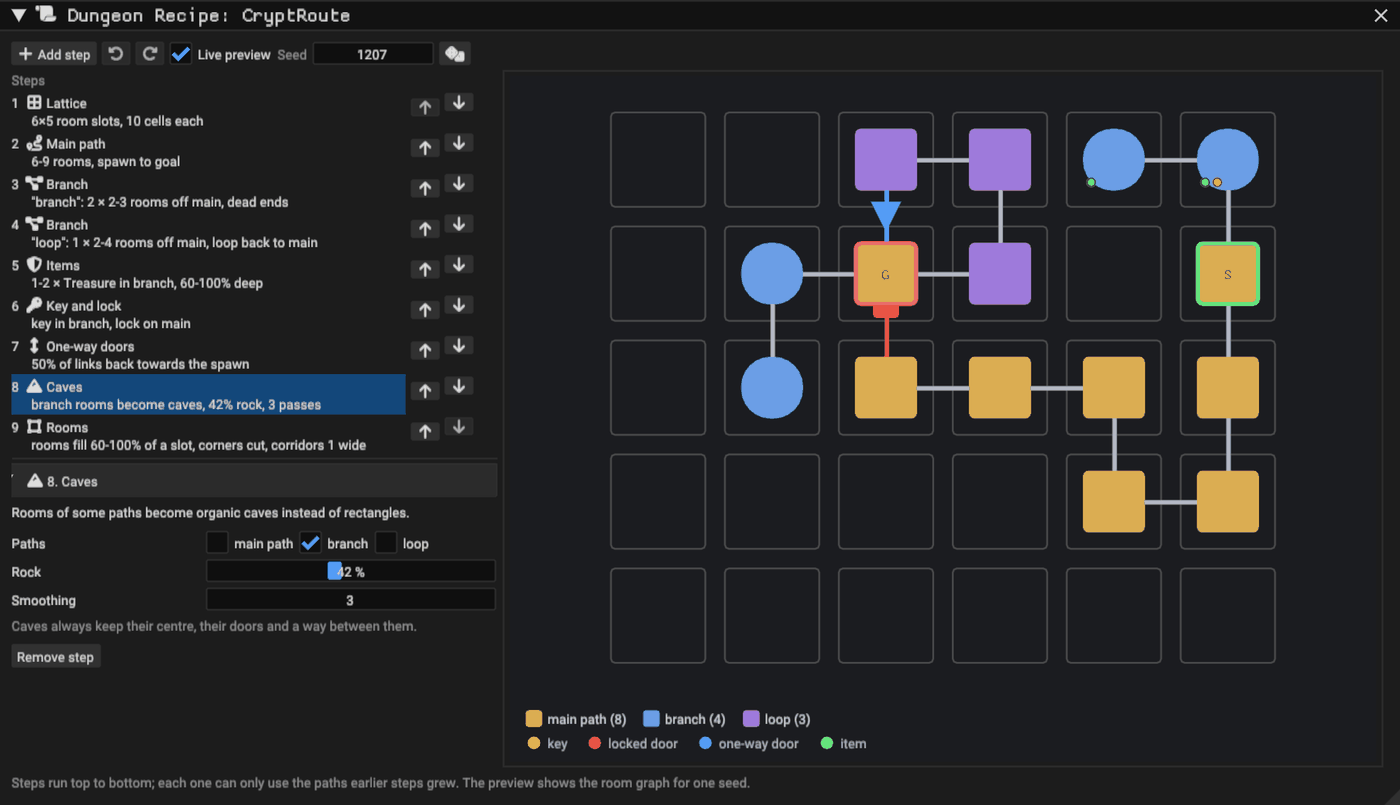
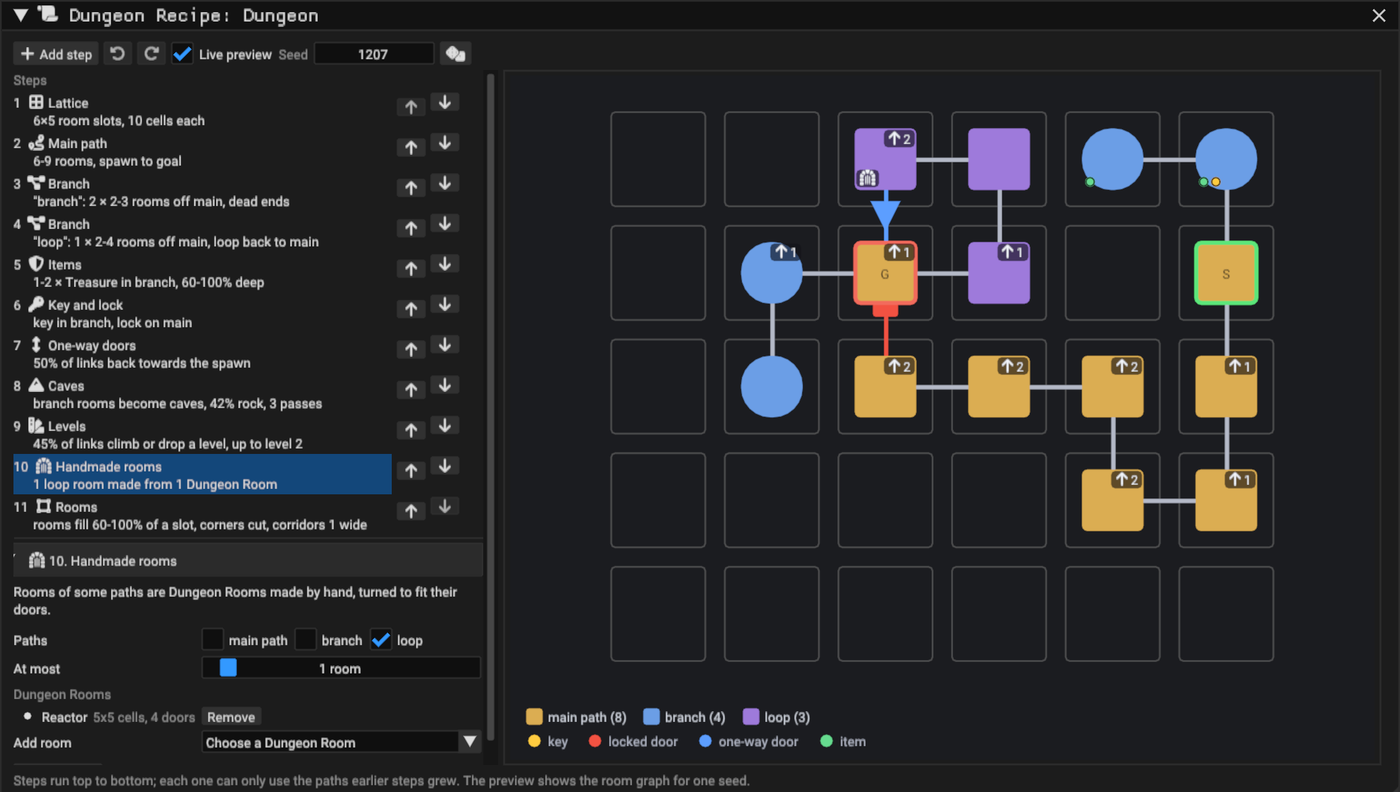
assets/Dungeons/Recipes/) and opens it, Edit opens the chosen one. The Project browser's Add > Dungeon Recipe creates one too, and double-clicking a recipe opens it. - The editor lists the steps on the left, in the order they run; the arrows move a step, Add step inserts one after the selection. The selected step's settings are below the list, each with a tooltip.
- The right side previews the room graph for one seed: one square per room slot, rooms coloured by path, links between them, the spawn (S) and goal (G), keys and items as dots, locked doors red with their key's number and one-way doors as blue arrows. Hover a room for its path, depth and contents. Seed and the dice button preview other seeds without touching any dungeon.
- Every valid edit is saved; with Live preview on, the map's dungeons that follow the recipe regenerate. A step with a problem (a path no earlier step grows, a range upside down) is amber, says why, and the recipe is not saved until it is fixed.
Steps
| Step | What it does | Settings |
|---|---|---|
| Lattice | The grid of room slots. Each slot holds at most one room; paths walk between neighbouring slots | Room slots (columns, rows), slot size in grid cells |
| Main path | The path from the spawn room to the goal room | Length in rooms |
| Branch | Paths that start next to rooms of other paths. With Loops back to empty they are dead ends; otherwise each ends next to a room of those paths and connects to it | Name, starts off, loops back to, count, length |
| Items | Named items in rooms of some paths, between two depths along each path (0% first room, 100% last), placed anywhere away from the doors, at the room's centre or against a wall | Name, paths, count, depth, in the room |
| Key and lock | A key in a room of some paths and the locked door it opens, on a link into a room of other paths | Key in, lock on |
| One-way doors | Links that lead back at least two rooms along the route open from the far side only | Chance |
| Caves | Rooms of some paths become organic caves that fill their slot | Paths, rock, smoothing |
| Levels | Rooms on different floor levels: each link climbs or drops one level with the climb chance, between the spawn's level and the highest level, and its corridor gets a flight of stairs | Climb chance, highest level |
| Handmade rooms | Rooms of some paths are Dungeon Rooms built by hand, turned to fit their links | Paths, at most, Dungeon Rooms |
| Rooms | How much of its slot each room fills, whether corners are cut, and the corridor width | Fill, cut corners, corridor width |
A recipe has one Lattice, one Main path and one Rooms step; Branch, Items, Key and lock, Caves and Handmade rooms steps can repeat, and each step can only name paths that earlier steps grow. The built-in recipe is a 6 × 5 lattice with a main path of 6–9 rooms, two dead-end cave branches with treasure, a loop, a key on a branch for a lock on the main path, one-way shortcuts, rooms on up to three floor levels and rooms with cut corners.
Levels and stairs
With a Levels step, rooms stand on different floors. The spawn room is level 0; growing outwards from it, each link climbs or drops one level with the step's chance, never below 0 or above the highest level. A level is 1.6 units, and a flight of stairs climbs it in four steps of 0.4 inside one corridor cell: below the 0.6 the Third Person character steps up and the 0.4 navigation climbs. Flights stand only on straight stretches of corridor, never at a door or next to a bend, so every room is flat and every door opens onto level floor; a link whose corridor has no room for its flights stays level, and a dungeon whose levels cannot all be joined stays flat.
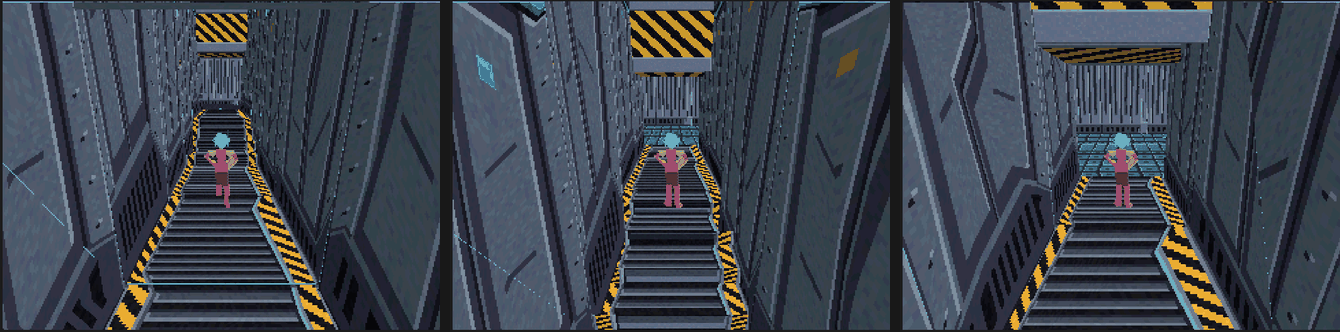
Everything follows the floor: walls reach from each cell's floor to the ceiling over its highest point, ceilings step up with the floor, and every piece of the style stands on its own level. Collision is solid but for the air over each walkable cell: floors fill down to the bottom, each flight is a box per step, and walls and ceilings reach up to the top, so no wall or ceiling top is a floor for the character or for navigation. The recipe editor shows each room's level in the corner of its slot (an arrow and the level) and in its tooltip; the band's summary counts levels and flights.
Levels belong to recipe layouts in 3D. A 2D dungeon keeps its rooms on one plane, and
rooms-and-corridors layouts have no Levels step. The Third Person controllers keep their
feet on each step going down; a character of your own needs the same: when it was on
the ground last tick and is not any more, probe the ground below (the Collision
library's ground) and move down onto it.
Always solvable
Every key and lock placement is checked by walking from the spawn through open doors, picking up keys and opening the doors they fit, until nothing new is reached: every room must be reachable, and the key's own door must really keep its room out of reach without the key, so a lock is never decorative. One-way doors are kept only when the same walk still reaches every room. Several keys never deadlock, because each one is checked with all the others in place.
When a step cannot be satisfied (a path longer than the lattice has room for, a branch with nowhere to grow), the whole recipe runs again with fresh random numbers, up to 64 times; after that the generator says which step failed and suggests loosening it.
Layout
Each room sits inside its slot, with empty cells around it. Corridors run straight between neighbouring rooms, or jog once inside the gap between their slots, always one cell clear of every other corridor and room. So the grid connects exactly the rooms the graph links: a locked door cannot be walked around through a neighbouring corridor. Unused slots are trimmed, keeping the dungeon centred on its generator.
Rooms are rectangles, rectangles with cut corners (one cell, or a three-cell triangle in rooms at least eight cells across), or caves. A cave fills its whole slot: rock is scattered more densely towards its edges (Rock sets how much), then Smoothing passes of a cellular automaton turn it into rounded chambers. Every shaped room keeps its centre, its doors and a way from each door to the centre, and drops any pocket the centre cannot reach, so shapes never break the route or the solvability check. Walls, wall tops, collision, navigation and 2D terrain follow the shape like any other floor.
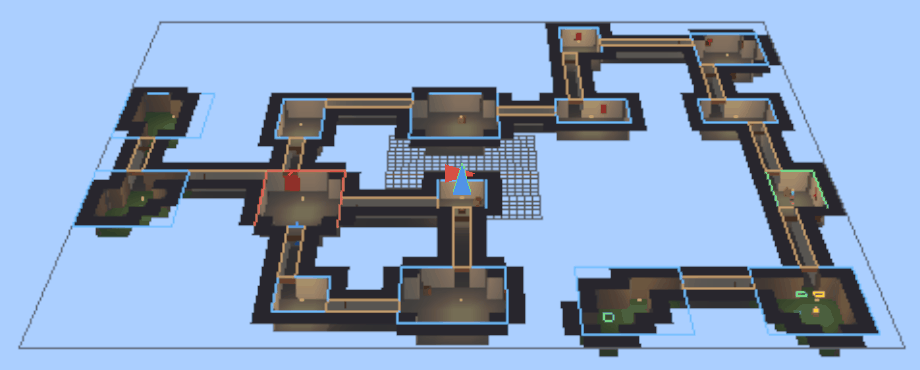
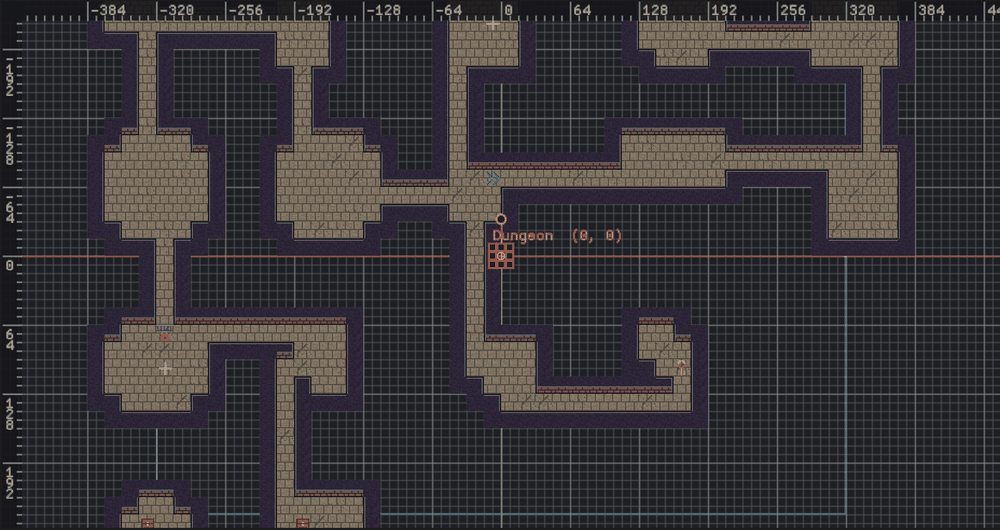
Recipe layouts add spots for the style (see Spots): Key, Locked door, One-way door and Item. The built-in look places working keys and doors on the first two. It marks the others: in 3D a green pedestal for items and a blue arrow on the floor pointing through each one-way door (keys also float above a gold pedestal); in 2D marker tiles from the built-in dungeon tiles (chevrons and a chest) on a decoration layer.
Keys and doors that work in game
The style pieces Key and Door place ready-made keys and locked doors on Key and Locked door spots, and the built-in style uses them:
| Piece | 3D | 2D | Behaviour |
|---|---|---|---|
| Key | A gold cube floating above the floor, with a trigger around it | An Area2D with the key sprite of the built-in tiles | Picked up the first time the player enters its trigger; it deactivates (hides and stops colliding) |
| Door | A slab filling the doorway, as wide as a cell and as high as the door height, with a solid collider | A StaticBody2D with the gate sprite, turned towards its corridor | Blocks the doorway until the key with its lock number is picked up, then deactivates |
Both cost one actor each, take a colour (a tint in 2D) and the piece's offset, and carry
their lock number; each key names the generator's Player in its player property, and
each door names its key's actor in its key property. A key deactivates the first time
its player enters its trigger (anything, while player names no live actor); a door
deactivates once the actor its key names is no longer active. The first generation
that places one adds
DungeonKey and DungeonDoor to the project in C++ (assets/scripts) unless the
project already holds them in Blueprint or Lua, as the Dungeon template
does for its flavor; the generator then uses those. They are ordinary project classes:
edit them to add a sound, an animation or a door that needs the player to come back
with the key. The generator never overwrites an edited copy; an unedited copy of an
earlier version (a key any collider picked up, or the C++ pair that shared a key ring)
is brought up to date the next time the dungeon is generated, and the report says so.
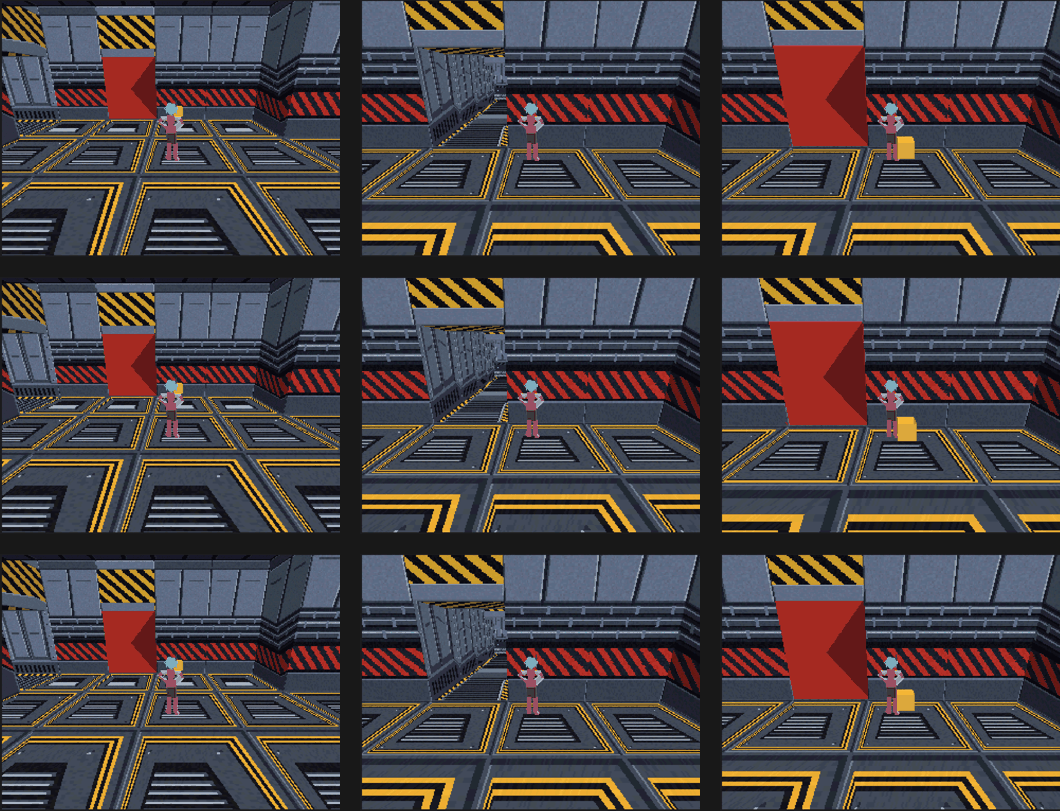
A key's trigger floats above the floor so the dungeon's own collision never touches it. Navigation is baked with the doors closed.
Custom actors work too: an actor placed on a Key or Locked door spot with an Actor
piece gets the lock number in any editable number property named lock, on its class
or on one of its components:
class EPOK_CLASS(Blueprintable, Domain=World3D, Id="your-class-uuid") MyGate : public epok::Actor3D {
public:
    EPOK_PROPERTY(EditAnywhere) uint32_t lock = 0;  // set by the Dungeon Generator
};
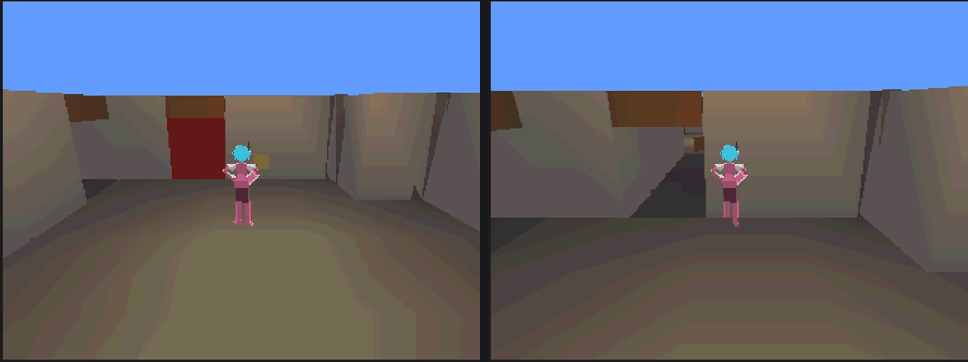
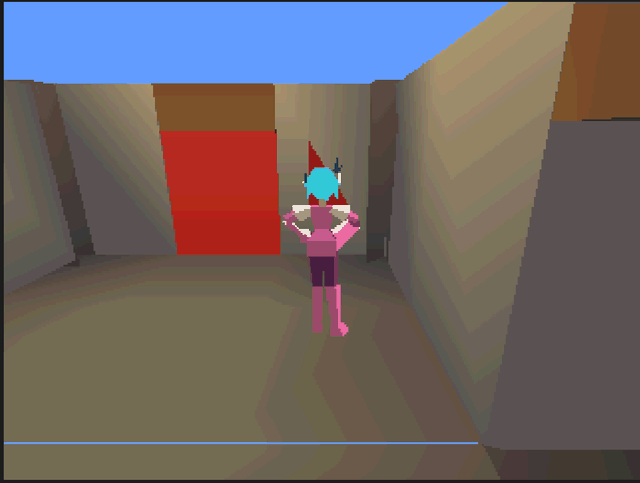
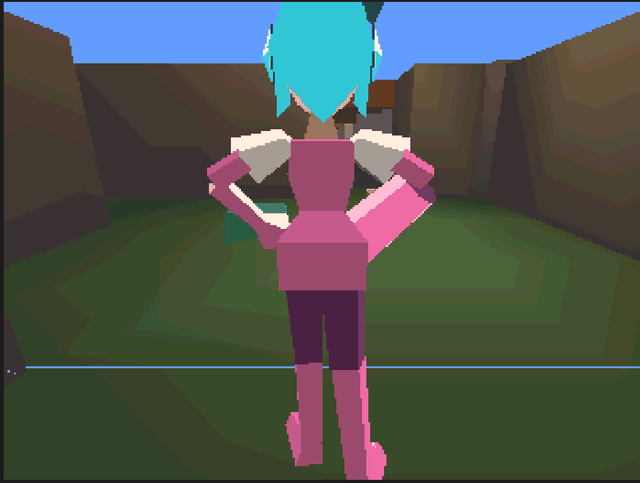
Item pieces can pick items by name with Item name, so a "Treasure" item can become a chest and a "Potion" a bottle, and any piece can keep to the rooms of one path with Path: mossy floors and rough walls in the cave branches, banners only along the main path.
Handmade rooms
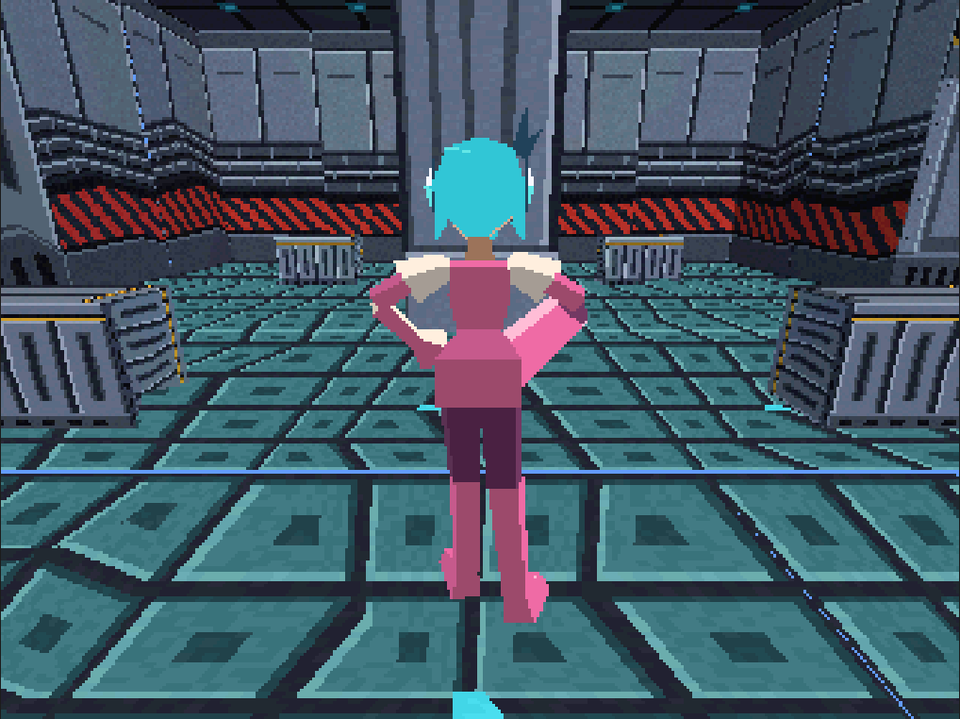
Some rooms are better made by hand: an arena, a shop, a reactor with its machines. A Dungeon Room is a room built once in any map and saved as an asset; a recipe's Handmade rooms step then places it wherever a room of its paths stands, turned in quarter turns to face its links, and the generator's corridors meet it at its doors.
Build a room
- Create an empty actor for the room's root. Its origin is the corner of the room's footprint: build towards +X and +Z, with the floor at Y 0, in cells of the generator's cell size (3 units unless you changed it).
- Put the whole room under it: floor, walls and ceiling (an Editable Mesh, cubes or your meshes; the generator draws nothing inside a handmade room), props, colliders, lights and actors with behaviour.
- Leave an opening in the wall wherever a corridor may arrive, and mark it with an empty
actor named
Door(Door 2,Door 3, …) on the footprint's edge, at the floor, centred on the edge cell. A room needs a door towards every link of the slot it fills, so more doors means more places it fits. - Select the root and choose GameObject > Save Selection as Dungeon Room... (or
Save as Dungeon Room... in the Hierarchy's right-click menu). The room is saved
in
assets/Dungeons/Rooms/and opens in the Dungeon Room editor.
The Dungeon template keeps its sample room in assets/Dungeons/Rooms/Workbench.epokmap:
open that map to see how the Reactor is built, change it, and save it again with
Update from selection.
The Dungeon Room editor
Double-click a Dungeon Room in the Project browser to open it.
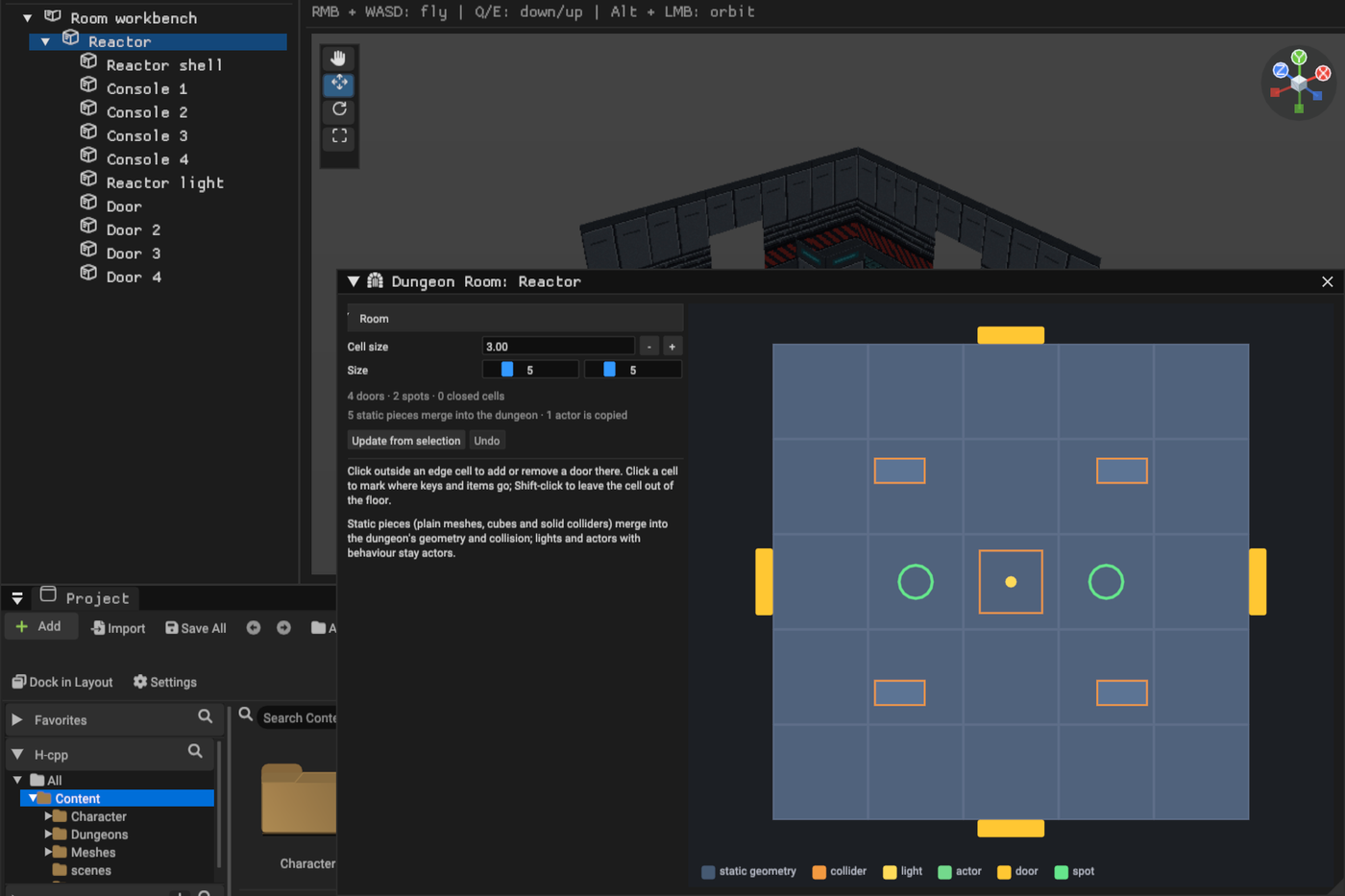
- Cell size is the grid cell the room was built for; dungeons with another cell size scale the room to fit. Size is the footprint in cells, across and deep.
- The floor plan shows the content: static geometry, colliders, lights, copied actors, doors and spots, each in the legend's colour. Click just outside an edge cell to add or remove a door there; click a cell to make it a spot where keys and items go first; Shift-click a cell to leave it out of the floor, for rooms that are not rectangles.
- The summary counts doors, spots and closed cells, and says how many pieces merge into the dungeon and how many actors are copied.
- Update from selection replaces the content with the children of the selected actor, keeping doors and spots. Every edit is saved and is one Undo step; the map's dungeons that use the room regenerate.
Use rooms in a recipe
Add a Handmade rooms step, tick its Paths, and add the rooms with Add room. At most caps how many rooms the step makes, in the order the recipe grew them; 0 makes every room of the paths by hand.
- Each room of the paths takes a Dungeon Room that fits its slot, turned, and has a door towards each of its links. The least used room comes first, so a list of rooms varies the dungeon. A room that none fits is generated as usual, and the generation report says why.
- Corridors meet the room at its doors; doors that no corridor uses are closed with the style's walls. Keys and items of the room go to its spots first.
- The recipe editor marks handmade rooms with the room icon; hover a room for the Dungeon Room it uses.
- With a Levels step, the room stands on its level like any other.
Pieces become one of two things:
| In the room | In the dungeon |
|---|---|
| An actor with nothing but its transform, a mesh or cube, and a solid collider | Merged: its faces into the dungeon's geometry sections, its collider into the compound collider (exact for quarter turns). Faces of cubes resting on the floor and looking down are left out. |
| Anything else: lights, scripts, Blueprints, sound, particles, triggers | Copied as an actor under the generator, with an identity that stays the same each time the dungeon is generated |
A room of many props therefore costs quads, not actors. Both still count: every quad of a map also reserves render memory on the console, so a detailed room costs RAM even where it replaces a generated room (the template's Reactor adds about 35 KB), and every copied actor counts towards the 64 actors. At most keeps handmade rooms special and the budget in check; the band's meter counts them before you generate.
Editing a room makes the dungeons that use it out of date, like editing their recipe. Dungeon Rooms hold 3D content: a 2D dungeon draws handmade rooms as generated rooms of their shape, and the report says so. Footprints are 2 to 16 cells a side, and a step lists up to 32 rooms.
Dungeon Styles
A Dungeon Style decides what every spot of a dungeon becomes. It is an asset, so one style can dress many dungeons, and changing it restyles them all. Without a style a generator uses the built-in look: blockout geometry in 3D, the built-in tiles in 2D.
- In the generator band, Style chooses the style. New creates a style asset
holding the current look (under
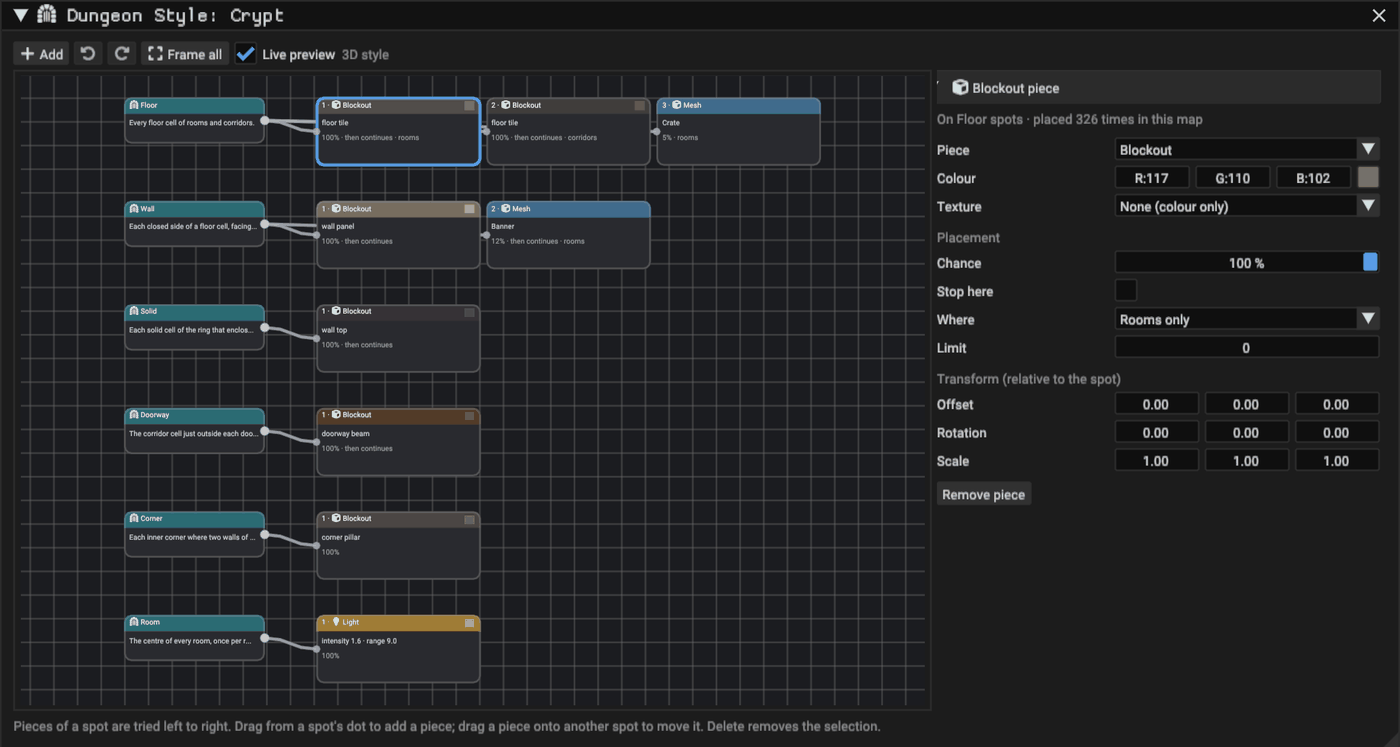
assets/Dungeons/Styles/) and opens it; Edit opens the chosen one. The Project browser's Add > Dungeon Style (3D) and (2D) create one too, and double-clicking a style opens it. - The editor shows spots on the left and the pieces each spot becomes to their right. Pieces are tried from left to right, and each piece header shows its place in that order: drag a piece left or right to change its priority.
- Add (or right-click the canvas) adds a spot or a piece, with a search field. Dragging from a spot's dot to empty canvas adds a piece to that spot; dropping a piece on another spot moves it there. Delete removes the selection; Ctrl+Z and Ctrl+Shift+Z undo and redo; the wheel zooms and F or Frame all shows the whole style.
- Every finished edit is saved. With Live preview on, the dungeons of the open map that use the style regenerate at once, so the Scene view shows the result; those regenerations are one undo step in the map.
- A piece that cannot place anything (no mesh chosen, a 2D piece in a 3D style, a terrain on a wall spot) has an amber outline and says why. The details panel counts how many times the selected piece is placed in the open map.
Spots
| Spot | Where | Facing (+Z) |
|---|---|---|
| Floor | Every floor cell of rooms and corridors | — |
| Wall | Each closed side of a floor cell | into the floor cell |
| Door | Each room side that opens onto a corridor | into the room |
| Doorway | The corridor cell just outside each door | towards the room |
| Solid | Each solid cell of the ring that encloses the floor | — |
| Ceiling | Each floor cell again, at the wall height (3D, with Ceiling on) | — |
| Column | Evenly spaced points along straight room walls, about one every two cells, at the start of their cell side | into the room |
| Corner | Each inner corner where two walls of a floor cell meet | away from the first wall |
| Room | The centre of every room, once per room | — |
| Key | Each key a recipe placed, at a room cell | — |
| Locked door | Each door that needs a key, on the guarded room's side | into the guarded room |
| One-way door | Each door passable only into its room | into the room |
| Item | Each item a recipe placed, at a room cell | — |
| Spawn, Goal | The centres of the spawn and goal rooms | — |
Spots sit at floor level, except Ceiling spots at the wall height. Wall, door, locked-door and one-way spots are on the cell edge, corner spots on the corner point, the others at the cell centre. Key, locked-door, one-way and item spots exist only in recipe layouts; a wide corridor's door has one spot per cell.
Pieces
| Piece | 3D / 2D | What it places | Cost |
|---|---|---|---|
| Blockout | 3D | The generator's own geometry for the spot: a floor tile, wall panel, wall top, ceiling tile, doorway beam, corner pillar or a column standing out of the wall (with collision), in a colour or texture (white keeps the texture's colours; a colour tints it) | Merged geometry |
| Mesh | 3D | An EditableMesh, merged into the dungeon's sections with its own materials | Merged geometry, no actor |
| Actor | both | An actor of any placeable class (C++, Blueprint or Lua), including Blueprint templates with child actors | One actor per placement |
| Light | 3D | A baked point light | One actor per placement |
| Terrain | 2D | The terrain a Floor or Solid cell is painted with | Tiles |
| Tile | 2D | One tile on a decoration layer above the floor, without collision | Tiles; one layer per TileSet |
| Key | both | A working key on Key spots | One actor per placement |
| Door | both | A working locked door on Locked door spots | One actor per placement |
Model meshes around the spot: floor level at 0, centred on the cell or the edge, and facing +Z into the room for walls and doors. Generated collision always comes from the layout; give props that must block the player an Actor piece with a collider instead.
Placement
| Field | Meaning | Default |
|---|---|---|
| Chance | Percentage of eligible spots that get the piece | 100 |
| Stop here | When the piece places, pieces to its right are skipped at that spot. Off, it decorates and the next pieces are tried too | on |
| Where | Anywhere, rooms only or corridors only | Anywhere |
| Limit | Most placements in one dungeon, spread at random; 0 has no limit | 0 |
| Item name | Item spots only: just the items with this name (any case); empty takes every item | empty |
| Path | Recipe layouts: just the spots in rooms of this path (any case), such as main or a branch's name; corridors belong to no path |
empty |
| Same for the whole room | Roll the chance once per room, so a room takes the piece on every spot or on none: texture variants and themed rooms. Corridor spots roll one by one | off |
| Offset, Rotation, Scale | Relative to the spot (2D: offset in pixels for actors) | 0, 0, 1 |
Texture variants are pieces that stop, roll once per room and sit left of the plain piece: with a first variant at 33% and a second at 50%, a third of the rooms take each. The built-in pieces do not stop: a piece added to their right decorates on top of them, and one added to their left that stops replaces them. For example, a wall mesh with a 15% chance placed left of the blockout wall replaces 15% of the walls; a torch mesh placed to its right adds torches to 15% of them. Each piece draws its own random numbers from the seed, so editing one piece never reshuffles another.
Volumes
Volumes are rectangles of the generator's grid that shape its layout: to fit the dungeon around art made by hand, keep it inside an area, force a room in a place, or make it symmetric. They are part of the generator's settings, so they cost nothing on the console.
| Volume | What it does | Layouts |
|---|---|---|
| Keep out | No room or corridor uses its cells | Both |
| Only here | With any Only here volume, rooms and corridors stay inside them | Both |
| Room here | A room fills it, besides the rooms the settings scatter | Rooms and corridors |
| Mirror left-right, Mirror front-back | Rooms scattered in its first half are repeated in its second half; a Room here volume across the middle stays as it is | Rooms and corridors |
Open Volumes in the generator band and press Draw volumes...: the window shows the whole grid from above, as the Scene view does (+Z up in 3D), with the layout the settings give. Pick a kind and drag on the grid to draw one; drag a volume to move it, its corner to resize it, and right-click it to remove it. The layout follows every change; Generate builds it into the map. The band lists the volumes with their kind, which can be changed there, and the Scene view outlines them on the grid in their colours.
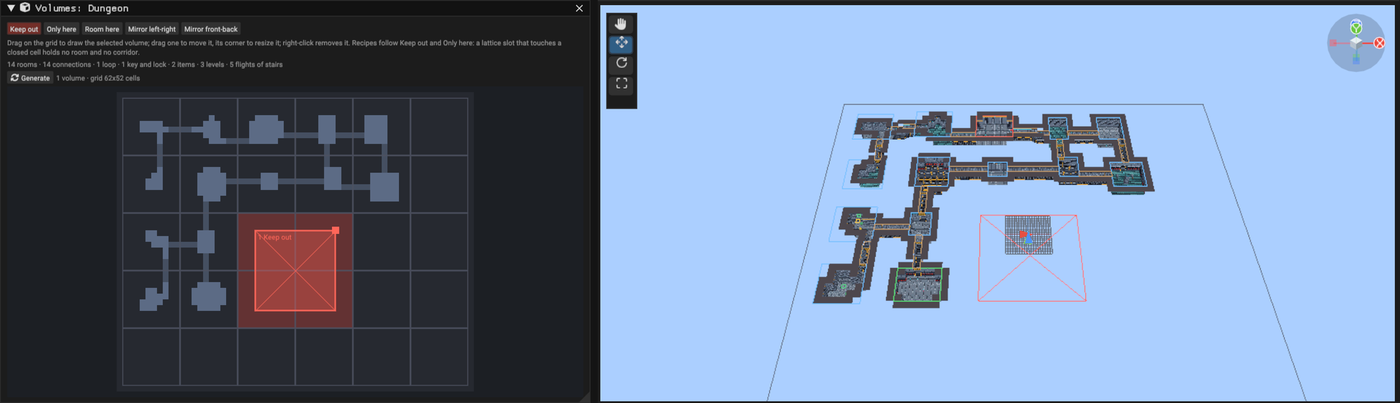
A recipe works on its lattice: a slot that touches a closed cell holds no room and no corridor, so its paths grow around it, and the window shades the slots a volume closes. A recipe dungeon with volumes keeps its whole lattice under the generator instead of being cropped to its rooms, so volumes stay where they were drawn whatever the seed.
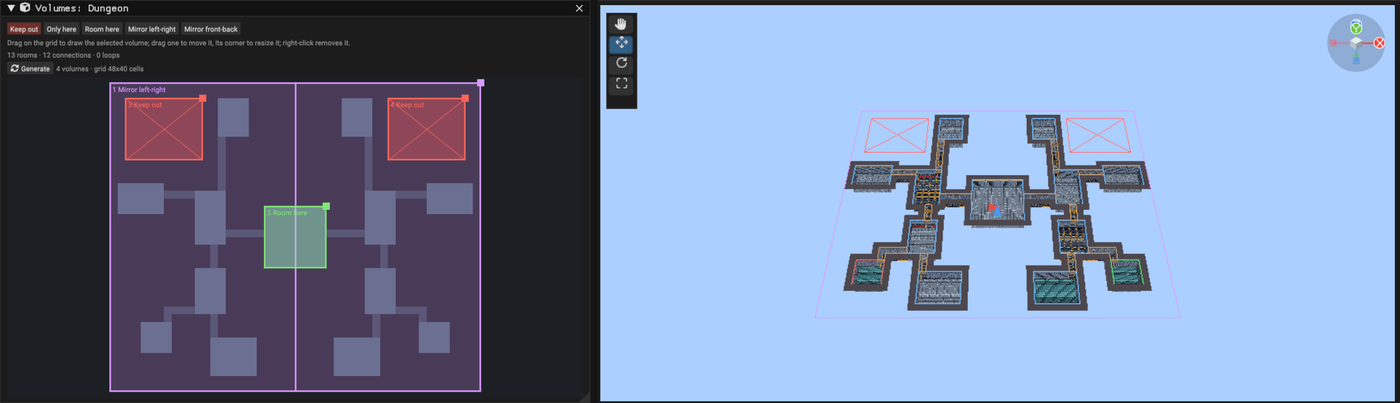
A generator holds up to 32 volumes, each inside its grid; volumes that close every cell, or a Room here volume smaller than two cells a side, are reported in the band.
Gameplay queries
Game code can ask about the generated dungeon on the console: which room the player is in, which room comes next on the way to the goal, where the keys and locked doors are, and where there is free floor for an enemy or a chest. Every generation bakes this with the dungeon, and the map cooks it, so it costs a few constant tables and no actors.
Open Gameplay queries at the bottom of the generator band to see the rooms as game code numbers them, with their path and their roles (spawn, goal, key, locked, item). Pointing at a row picks that room out in the Scene view; its tooltip gives the level, the rooms to the spawn and to the goal, its links and its free spots.
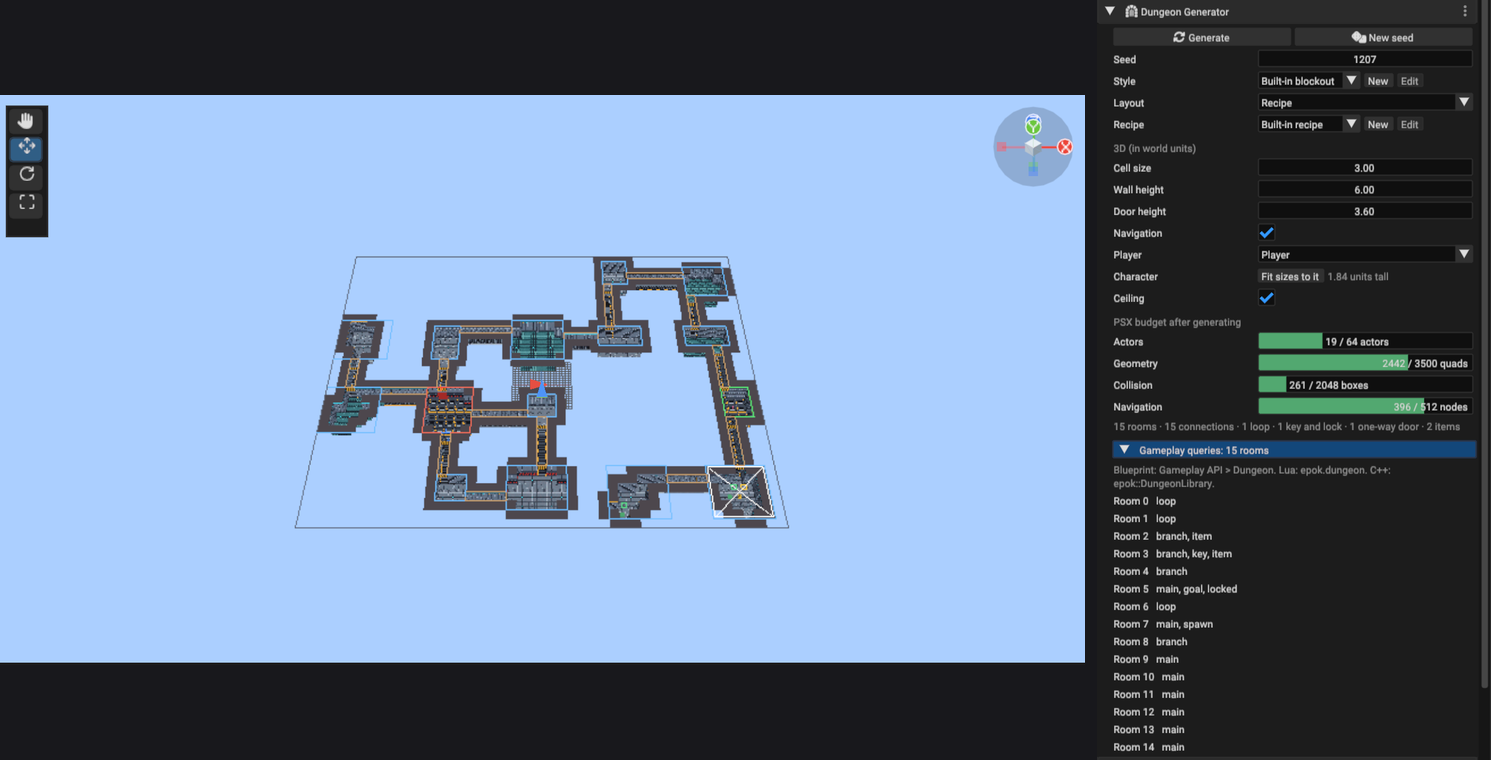
The queries are one library in every flavor: Gameplay API > Dungeon in the Blueprint
node menu, epok.dungeon in Lua and epok::DungeonLibrary in C++.
| Query | Returns |
|---|---|
room_count() |
How many rooms the dungeon has |
room_at(point) |
The room holding a world point (pixels in 2D), or -1 in a corridor |
room_of(actor) |
The room a 3D actor stands in, or -1; in 2D pass its position to room_at |
spawn_room(), goal_room() |
The spawn and goal rooms |
room(index) |
A record: valid, index, center, minimum, maximum, level, path (0 is the main path, then branches in recipe order), depth (rooms from the spawn), steps_to_goal, neighbours, spots, and spawn, goal, key, item, locked |
neighbour(room, index) |
The index-th room linked to room, or -1 |
next_room(from, to) |
The room after from on a shortest way to to |
distance(from, to) |
Rooms between two rooms, or -1 |
item_count(), item(index) |
Keys (lock above 0) and other items: position, room, lock |
lock_count(), lock(index) |
Locked doors: the doorway, the room it guards and the lock its key opens |
spot(room, index) |
Free floor away from the room's doors, keys and items, up to eight per room |
seed(), random(stream, index, below) |
The dungeon's seed, and a number below below that is the same for the same stream, index and seed on every run |
A beacon that floats in the next room on the way to the goal, in C++:
const int32_t here = epok::DungeonLibrary::room_of(player);
const int32_t next = epok::DungeonLibrary::next_room(here, epok::DungeonLibrary::goal_room());
const auto target = epok::DungeonLibrary::room(next).center;
The same in Lua, then one enemy kind per room that never changes between runs:
local here = epok.dungeon.room_of(self.player)
local target = epok.dungeon.room(epok.dungeon.next_room(here, epok.dungeon.goal_room())).center
local kind = epok.dungeon.random(1, here, 3)
local where = epok.dungeon.spot(here, 0).position
Rooms are numbered as the generator built them and keep their numbers until the next generation. The queries describe the first generated dungeon of the map, up to 64 rooms; without a dungeon every query answers -1, 0 or an invalid record. A dungeon generated before the queries existed shows a warning with Regenerate.
Minimap
A dungeon can carry a minimap on the console: a map of its rooms and corridors in a corner of the screen that fills in as the player explores, with the player, the keys, the locked doors and the goal marked. Open Minimap in the generator band and tick Minimap; the map needs a Player, which it follows and marks.
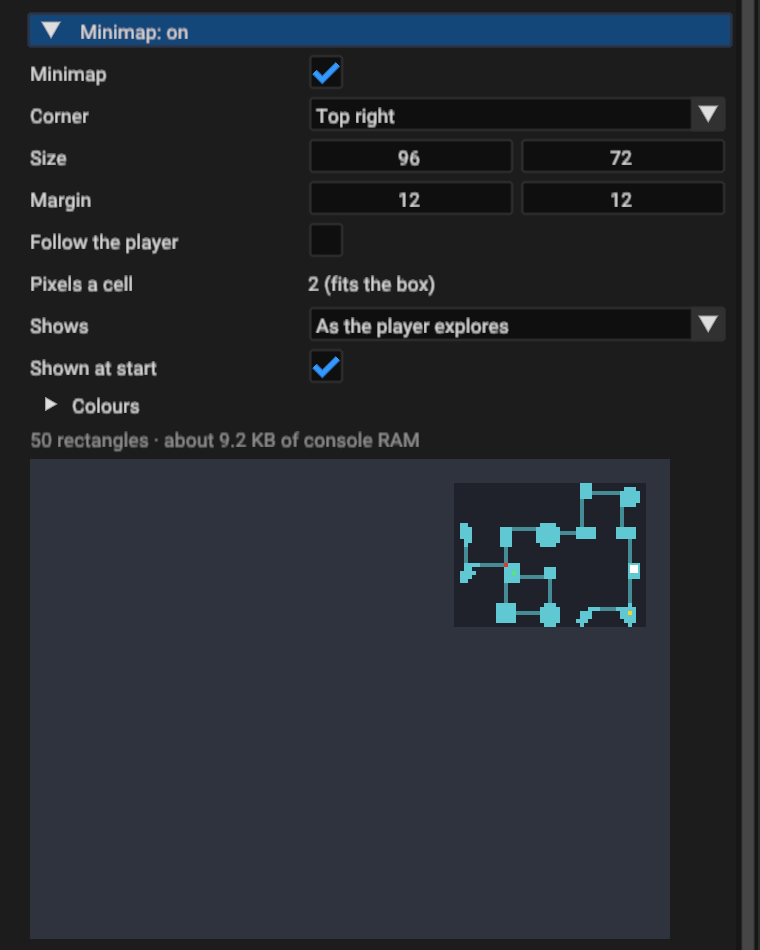
| Setting | What it does |
|---|---|
| Corner, Size, Margin | Where the box sits on the screen and how big it is, in pixels |
| Follow the player | Keeps the player in the middle of the box at Pixels a cell; keys and the goal out of view sit on the box's edge. Off fits the whole dungeon in the box (the band shows the scale) |
| Shows | As the player explores, or Everything from the start |
| Shown at start | Off hides the box until game code shows it |
| Colours | Rooms, corridors, corridors seen but not walked, the backdrop, the player, keys, locked doors and the goal |
As the player explores, a room shows in full once the player enters it, together with dim stubs of the corridors that leave it; a corridor shows once walked. Keys show once their room is explored and disappear when picked up; a locked door shows once its room or its doorway is seen and disappears when it opens. The goal shows once its room is explored. The picture under the settings shows the console's screen with the map fully explored and the player at the spawn. In 3D the map has +Z at the top, the way the Scene view looks from above and the camera faces at the start; in 2D it is the screen's own up.
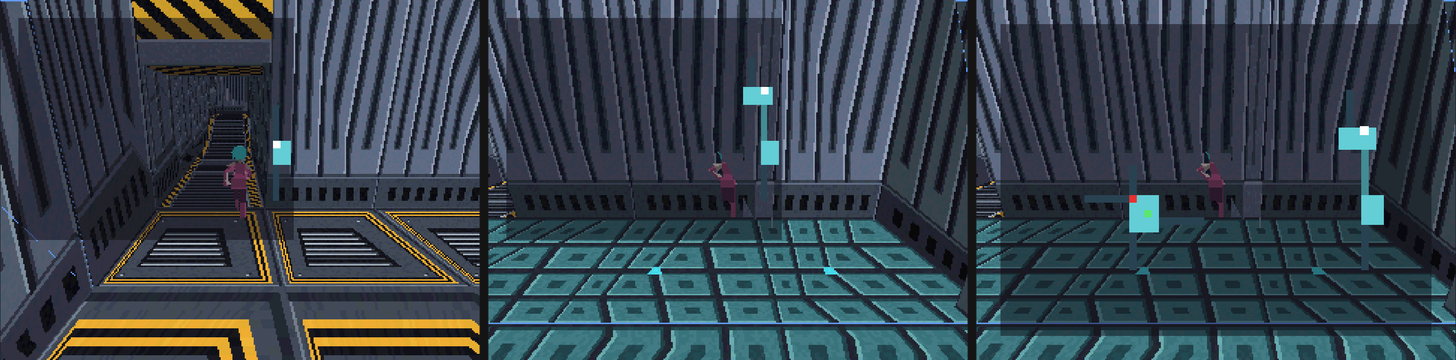
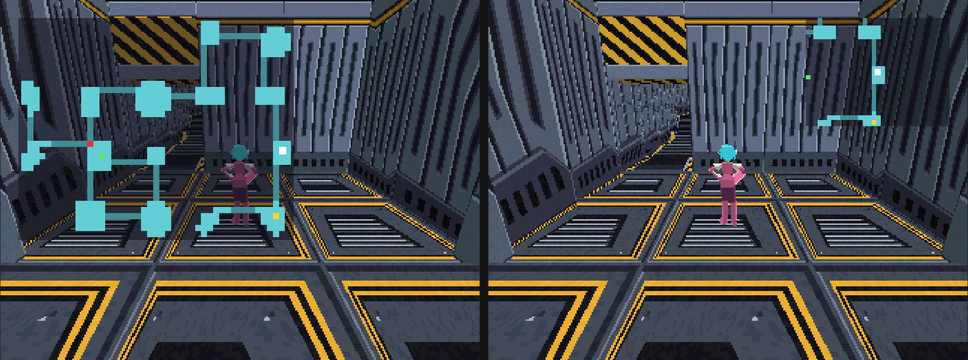
Game code shows and hides the map and the explored rooms through the same Dungeon library as the queries:
| Function | What it does |
|---|---|
show_minimap(visible), minimap_shown() |
Shows or hides the box |
show_full_map(full), full_map_shown() |
Fills the screen with the map, over the box: a map screen or a pause menu |
explore_room(room), room_explored(room) |
Reveals a room, for a map item or a saved game, and asks whether one is explored |
explore_everything(), forget_explored() |
Reveals the whole dungeon, or hides it again |
Opening the full map while Select (button 0) is held, in Lua:
epok.dungeon.show_full_map(epok.input.held(0, 0))
The map is cooked with the map, from the generated dungeon: changing its settings needs
no new generation, but a dungeon generated before the minimap existed must be generated
again. It draws over the world and under the HUD, as flat rectangles: the band counts
them and gives the console RAM the map takes (about 9 KB for the Dungeon template's
dungeon, most of it the drawing code). A minimap keeps up to 255 rectangles of a dungeon
up to 255 cells across; rooms past the 64th count as corridors. Levels share one plane
on the map, as rooms on different floors never overlap. Exploring needs the minimap on;
room_explored answers false without it.
PSX budget
The band shows what the map will hold after generating, so a dungeon that would not build is visible before it is generated.
| Meter | Limit | Notes |
|---|---|---|
| Actors | 64 per map | A 3D dungeon uses about eight to fifteen: geometry sections, collision, up to twelve navigation volumes, spawn, goal and a light when the map has none. Actor, Light, Key and Door pieces add one each. Every actor also costs runtime memory (several KB on the console), so prefer Mesh pieces for decoration. |
| Geometry | 3,500 quads per map | Counts the whole map. Surfaces are split every 4 units when compiled. |
| Collision | 2,048 boxes | One compound collider per dungeon. |
| Navigation | 512 nodes | Spacing grows with the floor area; very large floors skip navigation. |
| Tiles (2D) | 65,536 cells per layer |
A 3D dungeon must stay within 254 units across (grid size × cell size), because mesh vertices and collider boxes are stored within ±128 units of the generator. The generator must be moved only, not rotated or scaled; the amber box offers a fix.
Seed bench
Test seeds... under the band's budget meter opens the seed bench: it generates the layout of many seeds with the generator's settings, recipe and style, without touching the map, and measures each against the console's budget: actors, quads, collision boxes and navigation in 3D, tiles in 2D, and the attempts its recipe took.
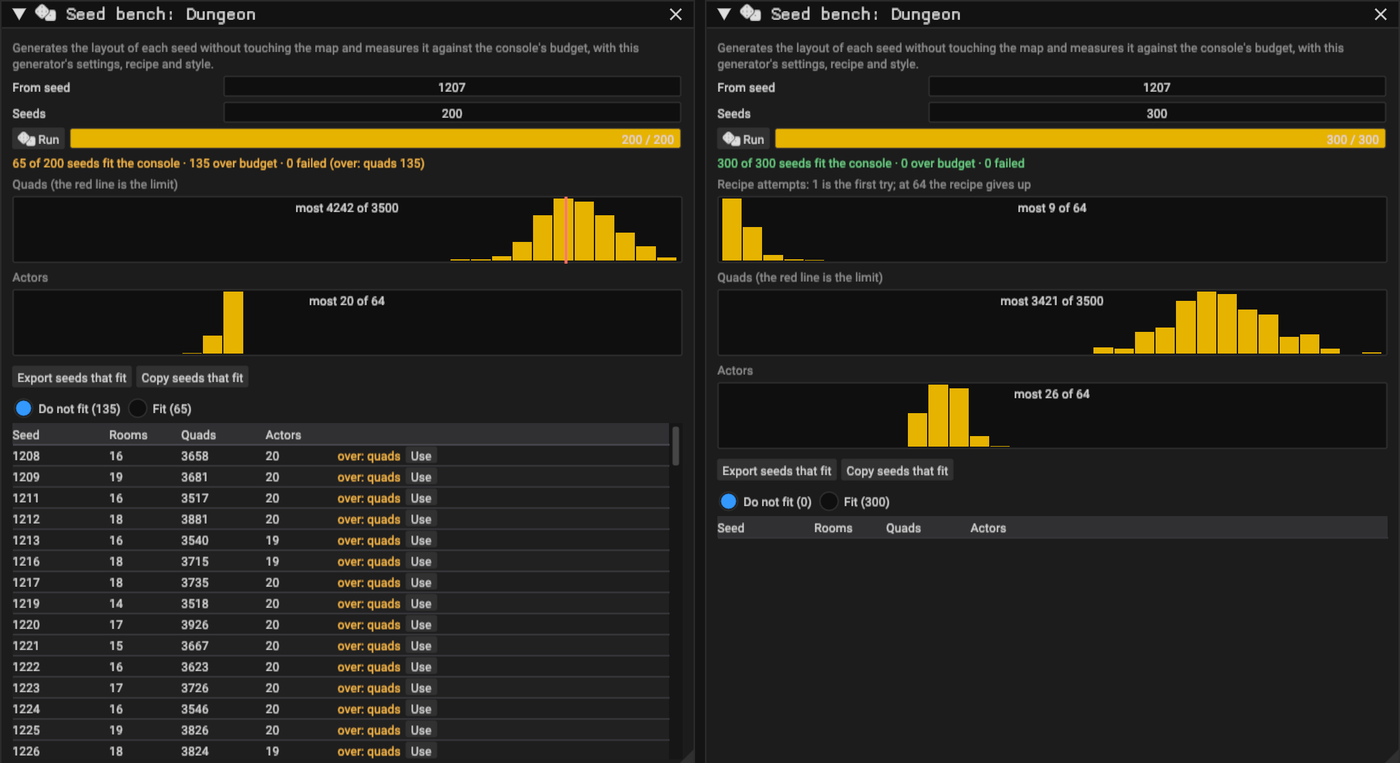
- Set From seed and how many Seeds, then Run; the bench measures a few seeds each frame, about 20 ms a seed, and the editor stays responsive.
- The summary counts the seeds that fit, those over budget (and which limit) and those that could not be laid out. Histograms show the recipe attempts (1 is the first try; at 64 the recipe gives up and asks to loosen a step), the quads with the limit as a red line when seeds pass it, and the actors.
- The table lists the seeds that do not fit, or those that fit, with their rooms, quads and actors; Use sets that seed on the generator and generates (one undo step).
- Export seeds that fit writes them as CSV, with what each measured, to
exports/dungeon-seeds/in the project; Copy seeds that fit puts them on the clipboard.
Settings that put a dungeon near a limit show up as a histogram leaning on the red line: loosen them before choosing a seed, so the next generation is not the one that breaks the build. The bench measures what the band's meter measures; console RAM also depends on the rest of the project, so build to check it.
Compound colliders
The generated collision is one Collider3DComponent carrying a list of boxes in the
actor's local space. The collider's own box encloses them and is only the broad phase:
movement, raycasts, overlaps, ground probes, triggers and the navigation bake all test
the individual boxes. An actor with a compound collider, and its parents, must not be
rotated or scaled.
Automation
- MCP
dungeon_generateregenerates a generator named by its actor, or creates one withcreate: "3d"or"2d".seedandsettingschange it first (styletakes a Dungeon Style asset id;source: "Recipe"withrecipe, a Dungeon Recipe asset id or none for the built-in recipe, switches to a recipe layout);new_stylecreates a style from the current look and assigns it,new_recipea recipe from the current one;clearremoves the generated content. The change is one entry inscene_history.asset_documentreads and replaces a style's or a recipe's document, refusing invalid ones with the step at fault. --generate-dungeon <actor>regenerates headlessly and saves the map;--generate-dungeon 3dor2dadds a new generator.--dungeon-seed Nand--dungeon-settings '<json>'(for example{"rooms":{"rooms":14},"spawn_actor":"Player"}) apply before generating;--dungeon-new-style <name>creates a style from the current look and assigns it,--dungeon-new-recipe <name>a recipe (and switches the layout to it).--open-map <path>opens a map of the project,--open-dungeon-roomthe first Dungeon Room in the room editor.--dungeon-settings '{"volumes":[{"kind":"KeepOut","min":[24,14],"size":[14,14]}]}'sets volumes (kindsKeepOut,OnlyHere,Room,MirrorX,MirrorY; cells of the generator's grid);--open-dungeon-volumesshows the first generator's volumes.--dungeon-seed-bench Nmeasures N seeds of the startup map's first generator, from its seed or--dungeon-seed, prints the summary and the seeds that do not fit, and exports those that fit;--open-dungeon-seeds Nshows the bench run over N seeds.
Determinism
Generation uses integers and the dungeon random stream. runtime/dungeon_random.hpp
is the C++ twin of the editor's stream; both are tested against the same values, so a
seed chosen in the editor can be reproduced on the console. Generated asset and actor
identities derive from the generator and the role of each piece, so regenerating
rewrites the same files and keeps references to the generated actors valid.
Verification
cargo test dungeoncovers layouts (reachability, spacing, loops, validation), recipes (reproducible graphs, solvability with several keys, locks that cannot be walked around on the grid, loops, one-way doors, readable errors), the bake into real projects (cook, navigation bake, regeneration, clearing, spawn placement, markers, face winding) and the random stream's golden values.python tests/runtime/verify_spatial.py compound_collision dungeon_randomruns the compound collider and random stream host tests.- Screenshot a generated dungeon with
--screenshot <png> --frame-dungeon(add--screenshot-2dfor a 2D generator), the recipe editor with--open-dungeon-recipe <step>, the room editor with--open-map <map> --select-actor <root> --open-dungeon-room, and gameplay with--screenshot-game --screenshot-input "500:16,2600:0".