
Build a dungeon room by hand
START WITH THE BIG PICTURE
What does this part of Epok do?
Build a room by hand once, save it as a Dungeon Room, and let recipes place it in every dungeon turned to fit its corridors. Then use volumes to keep the generator away from art of your own.
- 01Build the room under one actor, with Door markers
- 02Save it and mark doors and spots on its floor plan
- 03Add it to a Handmade rooms step and generate
What is happening under the hood?
- Plain meshes, cubes and solid colliders merge into the dungeon; lights and scripted actors are copied.
- Rooms turn in quarter turns, and doors nobody uses are walled by the style.
- Keep out and Only here volumes work with recipes; Room here and Mirror with rooms-and-corridors layouts.
Field note: Keep At most small: every quad of a map costs console RAM, even inside a beautiful room.
Generated rooms are great until you need the room: the boss arena, the shop, the reactor humming in the middle of the base. This tutorial builds a room by hand once and lets the generator drop it into every dungeon, turned the right way, with corridors arriving exactly at its doors. Then it carves out space for art the generator should never touch.
You need a project made from the Dungeon template. If you followed Your first dungeon, you already have one. If not, the Hub's New project > Dungeon takes about as long as this sentence.
1. Meet the workbench
The template already contains a handmade room, so you can take one apart before you
build your own. Open assets/Dungeons/Rooms/Workbench.epokmap from the Content Browser.
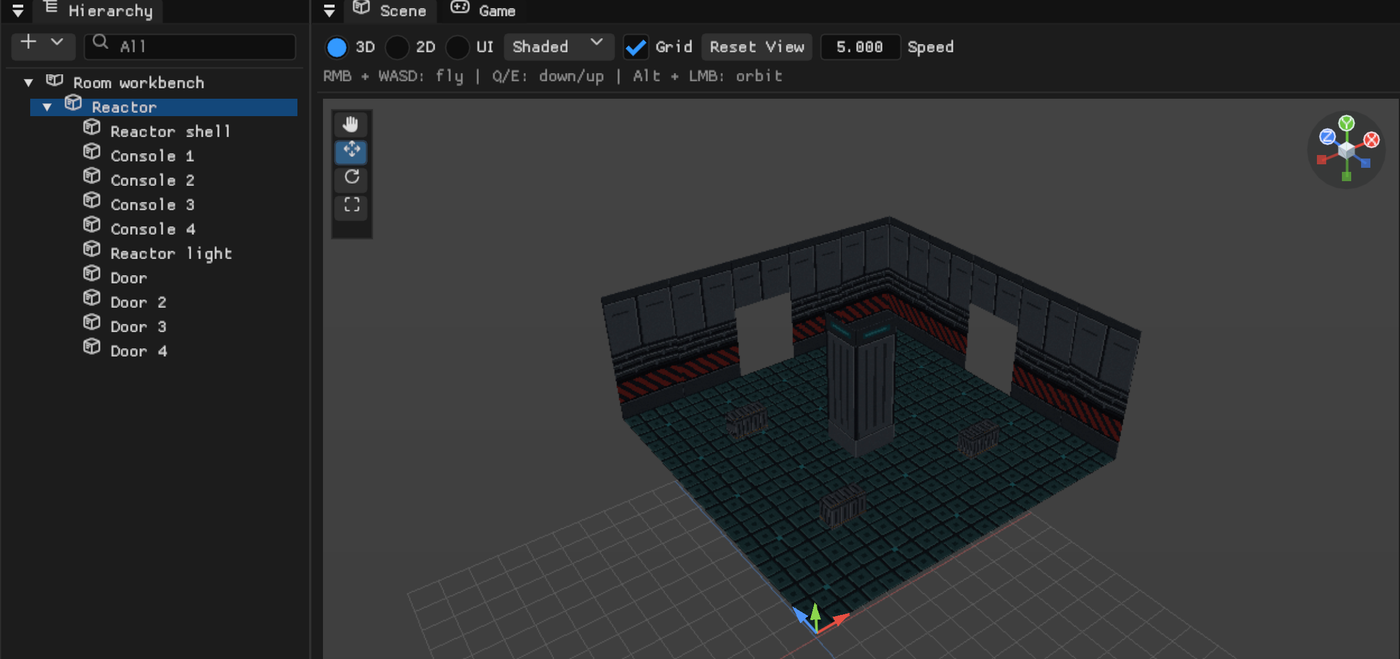
Everything hangs from one actor, Reactor:
- Reactor shell: an Editable Mesh with the floor, the walls, the ceiling and the core. The walls have openings where corridors can arrive.
- Console 1 to Console 4: cubes with colliders. Plain static pieces like these are merged into the dungeon's geometry, so ten consoles cost quads, not actors.
- Reactor light: a light. Lights and anything with behaviour stay real actors.
- Door to Door 4: empty actors named Door, sitting on the edge of the room. Each one tells the generator "a corridor may come in here".
The room is built from the root's origin towards +X and +Z, with the floor at height 0, in cells of 3 units. That is the generator's grid, and it is not negotiable.
2. Build your own room
Make an empty actor, call it something heroic, and build under it:
- A floor, walls and a ceiling (an Editable Mesh, cubes, or your own meshes). The generator draws nothing inside a handmade room, so if you forget the floor, your player will discover gravity.
- Openings in the walls wherever a corridor may arrive.
- An empty actor named
Door(thenDoor 2,Door 3...) in each opening, on the room's edge, at the floor. - Props, lights, a treasure chest with a script. Whatever makes the room the room.
More doors means more places the room fits: the generator only uses a room that has a door towards every room linked to it.
3. Save it as a Dungeon Room
Select the root actor and choose GameObject > Save Selection as Dungeon Room... (the
Hierarchy's right-click menu has Save as Dungeon Room... too). The room is saved in
assets/Dungeons/Rooms/ and opens in the Dungeon Room editor.
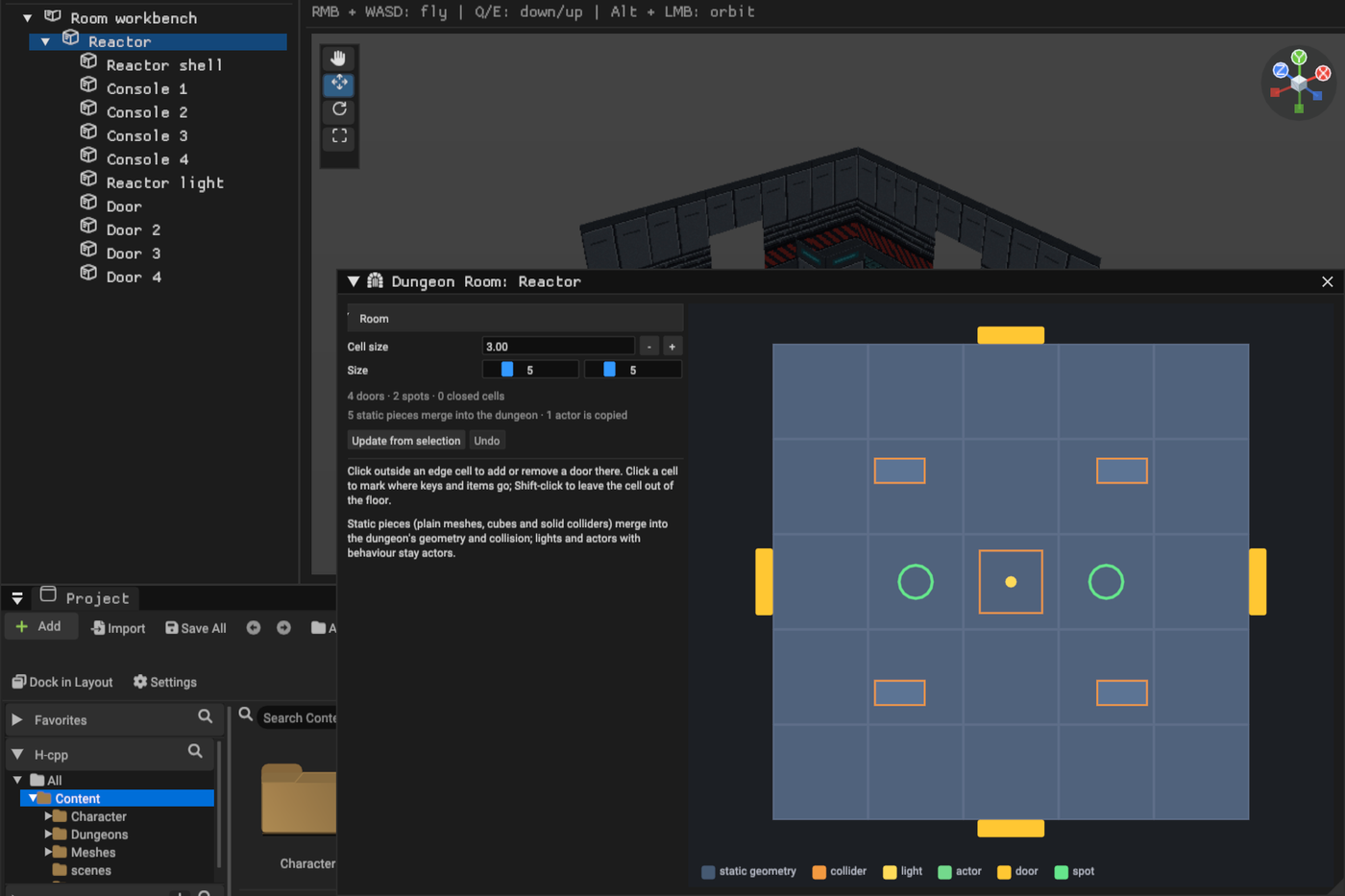
The floor plan shows the room from above, with the same orientation as the Scene view:
- Click just outside an edge cell to add or remove a door there.
- Click a cell to make it a spot: keys and items placed in this room go there first.
- Shift-click a cell to leave it out of the floor, for rooms that are not rectangles.
- Update from selection captures the room again after you change it in the map.
The summary line says how many pieces merge into the dungeon and how many actors are copied. Every edit saves itself and regenerates the dungeons that use the room.
4. Put it in the recipe
Open the recipe (Edit beside Recipe in the generator band) and select the Handmade rooms step, or add one. Tick the paths whose rooms may be handmade, add your room with Add room, and set At most to how many rooms it should replace.
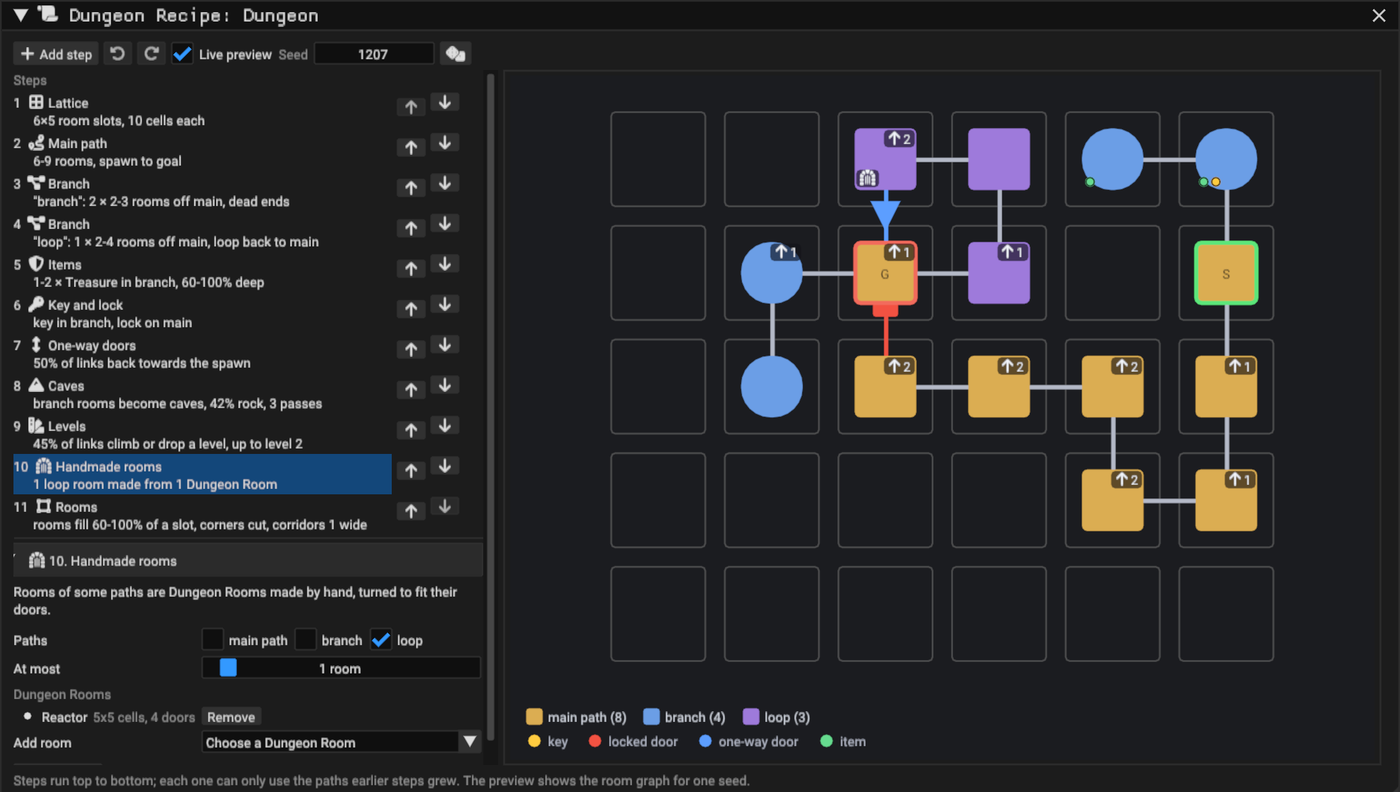
Keep At most small. Every quad of a map reserves render memory on the console, so a detailed room costs RAM even where it replaces a generated one. One special room is memorable; fifteen special rooms are a memory leak with good lighting.
In the room graph, handmade rooms carry a small room icon. Hover one to see which Dungeon Room it uses.
5. Walk into it
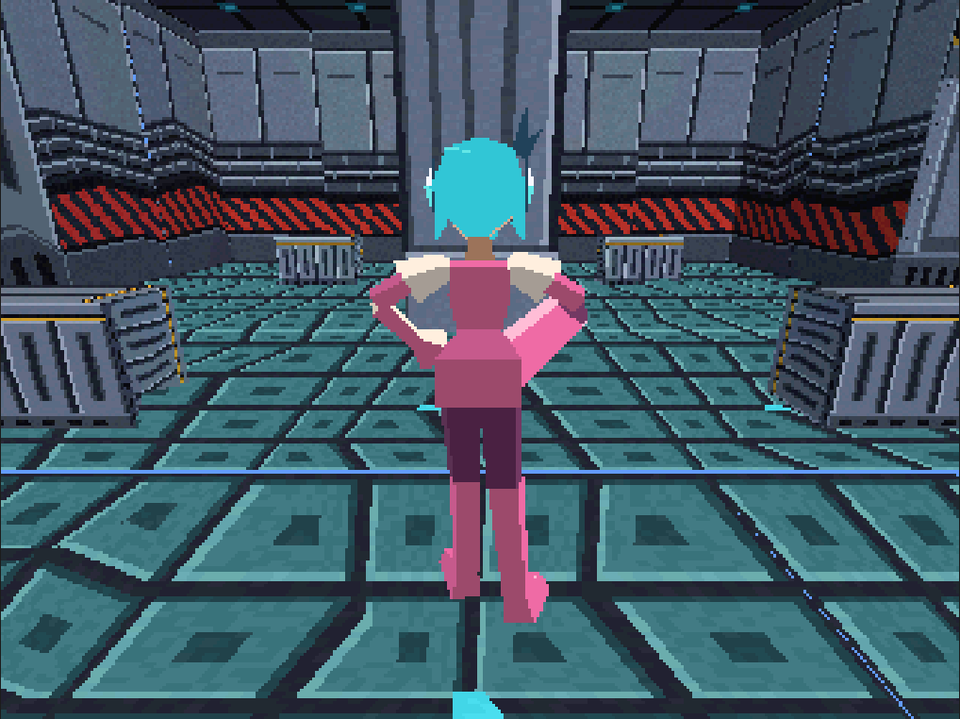
Generate, then press Play and find your room. The generator turned it in quarter turns until its doors faced its corridors, and closed the doors nobody uses with the style's walls.
6. Keep the generator out of your art
Sometimes the hand-made part is not a room inside the dungeon but something next to it: a courtyard, a waterfall, a very large statue of yourself. Volumes tell the generator where it may and may not build.
In the generator band, open Volumes and press Draw volumes.... The window shows the whole grid from above, with the layout your settings give.
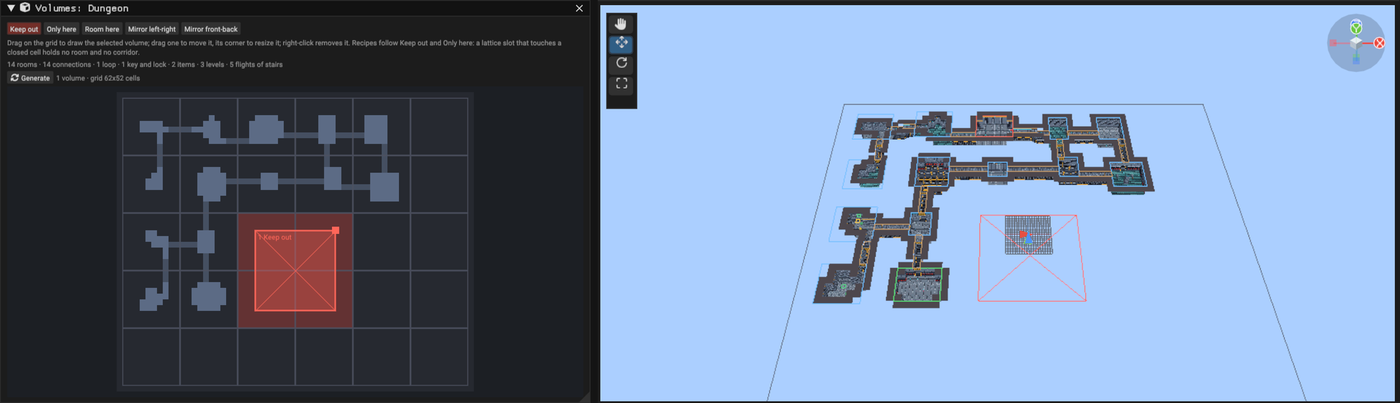
- Pick Keep out and drag a rectangle over the area to protect. With a recipe, the lattice slots it touches go red and stay empty: paths grow around them.
- Pick Only here instead to keep the whole dungeon inside an area.
- Drag a volume to move it, drag its corner to resize it, right-click it to remove it. The layout follows every change, so you can watch rooms politely step aside.
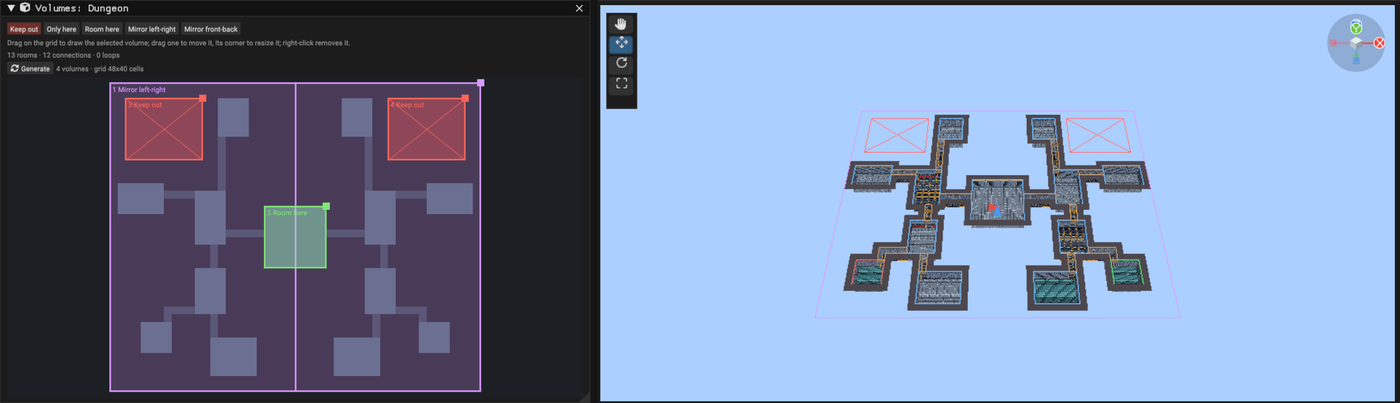
With a Rooms and corridors layout you also get Room here (a room exactly where you draw it) and Mirror (rooms in the first half repeated in the second). Combine them for a symmetric dungeon around a forced central room, the kind of floor plan that makes players say "this feels designed", because it was.
A recipe dungeon with volumes keeps its whole lattice under the generator instead of being cropped, so your volumes stay where you drew them whatever the seed.
Where next
- Dungeon Generator: every rule about handmade rooms, volumes and their limits.
- Your first dungeon: recipes, styles, the minimap and the seed bench.
You now own a room the generator respects. That is more than most landlords manage.